
By Seemab Akbar8 min readCRMERP Systems
In this guide
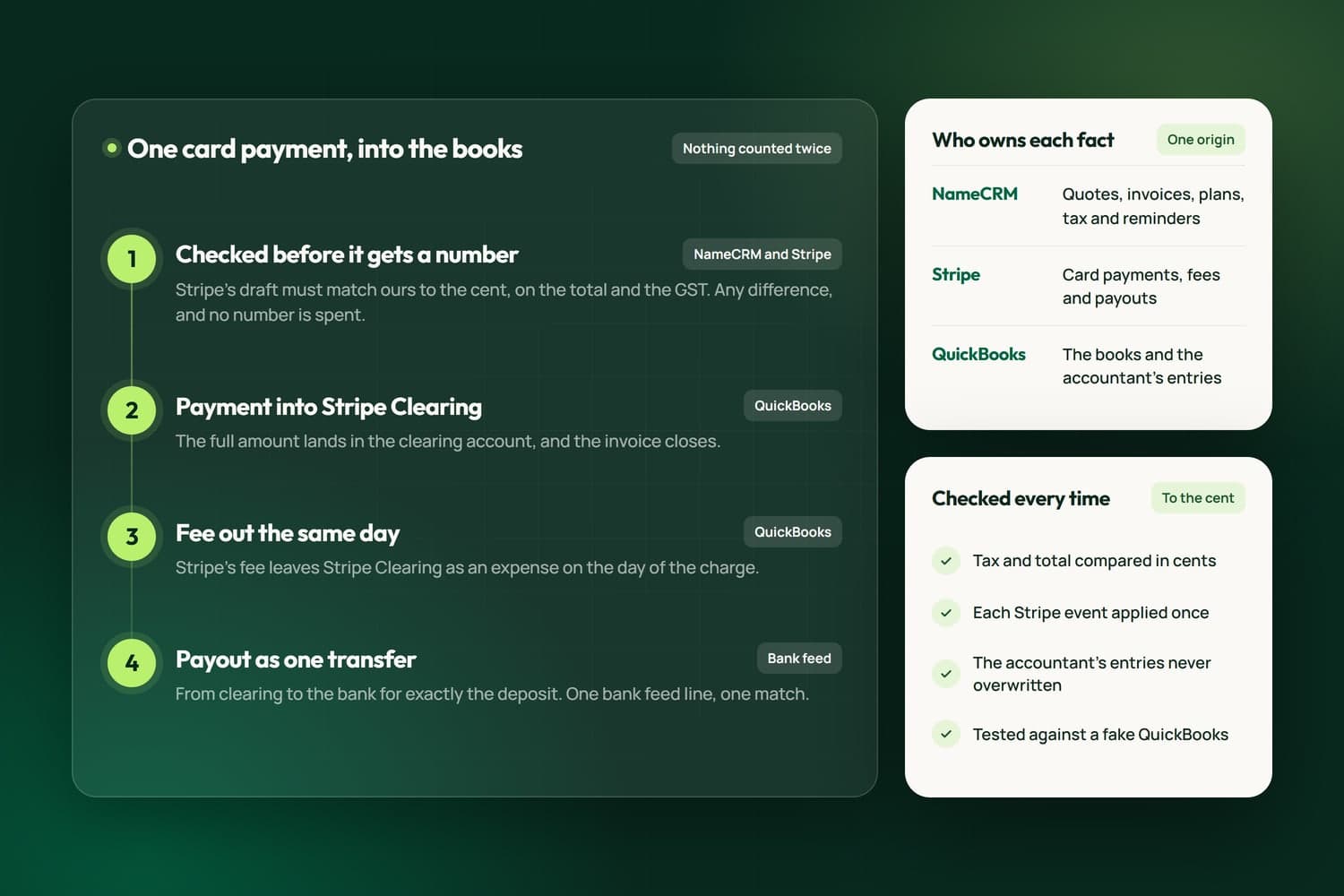
We run our own agency on NameCRM, a client system we built. Quotes, invoices, plans and payments start there. Card payments go through Stripe. Our accountant works in QuickBooks. In September 2026 we connected the three, and the connection itself was the small part. The real work was deciding which system is right when they disagree, and proving it before a real invoice depended on it.
What goes wrong when a CRM and the books disagree
Before the connection, our sales lived in two places. Some invoices were raised in QuickBooks and some in Stripe, each with its own number series, and anything that needed to be in both was typed in by hand. When we pulled both histories side by side, this is what we found:
- A sale in both places. One invoice had been paid by card in Stripe and was still open in QuickBooks. Connect the two without a plan and the sync creates a second copy of a sale that already exists.
- Money counted twice. The bank feed already brings every deposit into QuickBooks. If the sync also records a payment as a deposit, the same money lands in the books twice.
- Paid, but still owed. Two invoices the books showed as open had already been paid. The money was in the bank, but nobody had applied it to the invoices, so a reminder could have gone to a client who had already paid. We caught it before anything was sent.
- A cent that never goes away. Our CRM and Stripe round GST once per invoice. QuickBooks rounded it line by line, and on a two-line invoice that came to one cent more. The day the client paid in full, the books would have shown them owing one cent for good.
- A sale in the wrong month. Dates were being cut from timestamps in UTC, so an invoice issued after 5 PM Pacific was dated the next day in QuickBooks. An invoice written on the last evening of a month would have moved its revenue into the next month.
- US dollars in Canadian books. Our QuickBooks company is set up in Canadian dollars only, so a sale in US dollars has to arrive as the Canadian amount Stripe actually settled, never at a guessed rate.
None of these raised an error, and each system looked right on its own. Nobody notices until a client is chased for money they already paid, or the month does not balance.
Decide which system owns each fact
The rule that made everything else possible: every fact has one origin, and the other systems copy it.
- The CRM owns the sale. Quotes, invoices, plans, tax and reminders. When we create or change an invoice, we do it in the CRM.
- Stripe owns the card money. It takes the payment, holds the card, charges its fee and pays out to the bank. The CRM never stores a card number.
- QuickBooks owns the books. Every customer, invoice, payment and refund from the CRM is copied in with the same invoice number, and the entries our accountant makes there are never overwritten.
The same rule decides where reports come from. It would have been easy to add up the CRM's own payments and call it profit, but that is a second set of books, and a second set of books gives a second answer the moment the accountant moves something to another category. Our profit and loss screen reads QuickBooks' own reports instead.
It also settled the invoice number. We had two series, so we kept the one clients already saw on their invoices. A number is given out only when Stripe finalizes the invoice, and the CRM and QuickBooks carry that same number.
How one card payment reaches the books
Card payments are where counting twice is easiest, because the same money shows up in the CRM, in Stripe and in the bank feed. Stripe tells the CRM about each change through its events (we listen for 18 kinds). This is what the sync does with one payment:
- The invoice is checked before it gets a number. The CRM asks Stripe for its draft and compares the total and the GST to the cent. Any difference deletes the draft, so no number is spent on an invoice that does not match.
- The payment goes into Stripe Clearing. In QuickBooks, the full amount lands in an account called Stripe Clearing and the invoice closes.
- The fee comes out the same day. Stripe's fee leaves Stripe Clearing as an expense on the day of the charge.
- The payout is one transfer. When Stripe pays out, the payout is booked as a transfer from Stripe Clearing to the bank for exactly the amount deposited. One line in the bank feed matches one transfer, so nobody has to match a lump deposit back to five invoices by hand.
An e-Transfer goes straight to the bank, so it skips the clearing account. And a payment that arrived before our QuickBooks books opened is already inside the opening balance, so the sync closes that invoice against the opening balance instead of depositing the money a second time.
The rules that stop a sync from writing twice
Connections fail halfway: the network drops, a service answers slowly, the same event is delivered twice. Each of these rules exists for one of those moments.
- Write down the intent first. Before the CRM writes anything to Stripe or QuickBooks, it records what it is about to do. A half finished attempt is then finished, not repeated.
- Recognize a repeat. Every event from Stripe is stored by its id, so an event delivered twice is applied once. Paid is final: a late event can never turn a paid invoice back into an unpaid one.
- Pair the history before syncing anything. When we connected, every sale that existed in both Stripe and QuickBooks had to be marked by a person as the same sale or a different one. Until every pair was decided, the sync held and wrote nothing to the books.
- Check after writing, exactly. After an invoice lands in QuickBooks, its tax and total are compared in cents. A difference becomes a failed sync that someone sees, never a tolerance.
- Refuse rather than guess. If two bank accounts could be the right one and nothing says which, the sync refuses. If a US dollar sale has not settled yet, it waits.
- Connect to the right company. One QuickBooks sign-in can reach more than one company, so the connection checks the company name exactly before it writes. Its sign-in tokens are encrypted at rest, and nothing QuickBooks returns is written to our logs.
How we test it: a fake QuickBooks
You cannot test a books sync by trying it on your real books. So our tests run against fake versions of QuickBooks that we wrote for the purpose, and the server code under test is the same code production runs.
The main fake holds entries, so a write can be read back and checked. It enforces QuickBooks' rule that you must hold the latest version of an entry before you change it, and answers with the same error the real one sends. Its entries follow the exact shape the real QuickBooks returns, field for field, because a fake built on a guessed shape lets tests pass while the real thing breaks. Other fakes refuse what QuickBooks refuses, such as a journal entry that does not balance, or round tax line by line the way QuickBooks did on the invoice that came out a cent off, so a test fails loudly if our fix is ever removed.
We learned that last point the hard way. A fake Stripe in one of our tests reported a paid invoice as owing nothing in the field called amount due. The real Stripe leaves amount due at the full amount and puts the zero in a different field. The test agreed with the bug because the fake did. It now carries Stripe's real shape.
A second harness opens the real app in a real browser, in light mode, dark mode and at phone width, and drives the Books screen against the same fake. Our safeguards are seen failing on purpose before we trust them: we put the old bug back and make sure a test catches it.
Vendors change underneath you, too. When Stripe released a newer API version, seven fields our code read moved to new places, and nothing reported an error. So we stopped letting code read Stripe's fields directly: one piece of code now reads every shape Stripe sends, old and new, and everything else asks it. A change like that now breaks one place, loudly, instead of many places quietly.
What to ask before you connect your CRM to QuickBooks
Whether you build the connection, buy an app for it or hire someone, these questions show quickly whether it was thought through:
- Which system owns the invoice number, the tax and the paid status? If the answer is both, expect duplicates.
- Where does a card payment land, and how does a payout match the deposit in your bank feed?
- What happens if the same payment is reported twice, or a write fails halfway?
- Is tax rounded per line or per invoice, and do your books end up with the same cent your client paid?
- What happens to the entries your accountant makes by hand?
- When a sync fails, who sees it, and where?
- Does any of your financial data reach an AI tool? In NameCRM it does not: no AI feature reads QuickBooks data, invoices or payments, and a test fails if one ever tries.
Ask your accountant to sit in on that conversation. They are the one who will live with the answers.
When a business needs more than a CRM
Connecting the books was one part of a larger job: getting the systems a business runs on to agree with each other. Some businesses need more than sales and billing. They need orders, purchase orders and day to day operations in one system that also talks to their books, which is what most people mean by ERP. We build those too, around the way the business already works: a centralized CRM platform that moved a multi-department organization in Surrey off separate legacy systems and paper, and an enterprise online hub that replaced slow multi-step processes with one system. Our team has been building websites and software since 2014, and the same rules apply: one owner for every fact, a check after each write to the books, and tests against a fake before anything touches real ones. Our ERP solutions page covers what that work involves.
NameCRM, with its Stripe and QuickBooks connection, is the client system we run our own business on. If you are weighing a custom CRM, or want the one you have to agree with your books, our custom CRM development page shows how we work. To see where automation would pay off first in your business, the AI Readiness Check takes two minutes and shows your score straight away.
Want this worked out for your business?
There is no price list here, because every build is different. The free 30-minute assessment comes first; then you get a written estimate before any work starts, with GST added on top.
Book the free assessment