Skip to content
Nametech Canada

AI strategy and implementation for Surrey and Metro Vancouver businesses

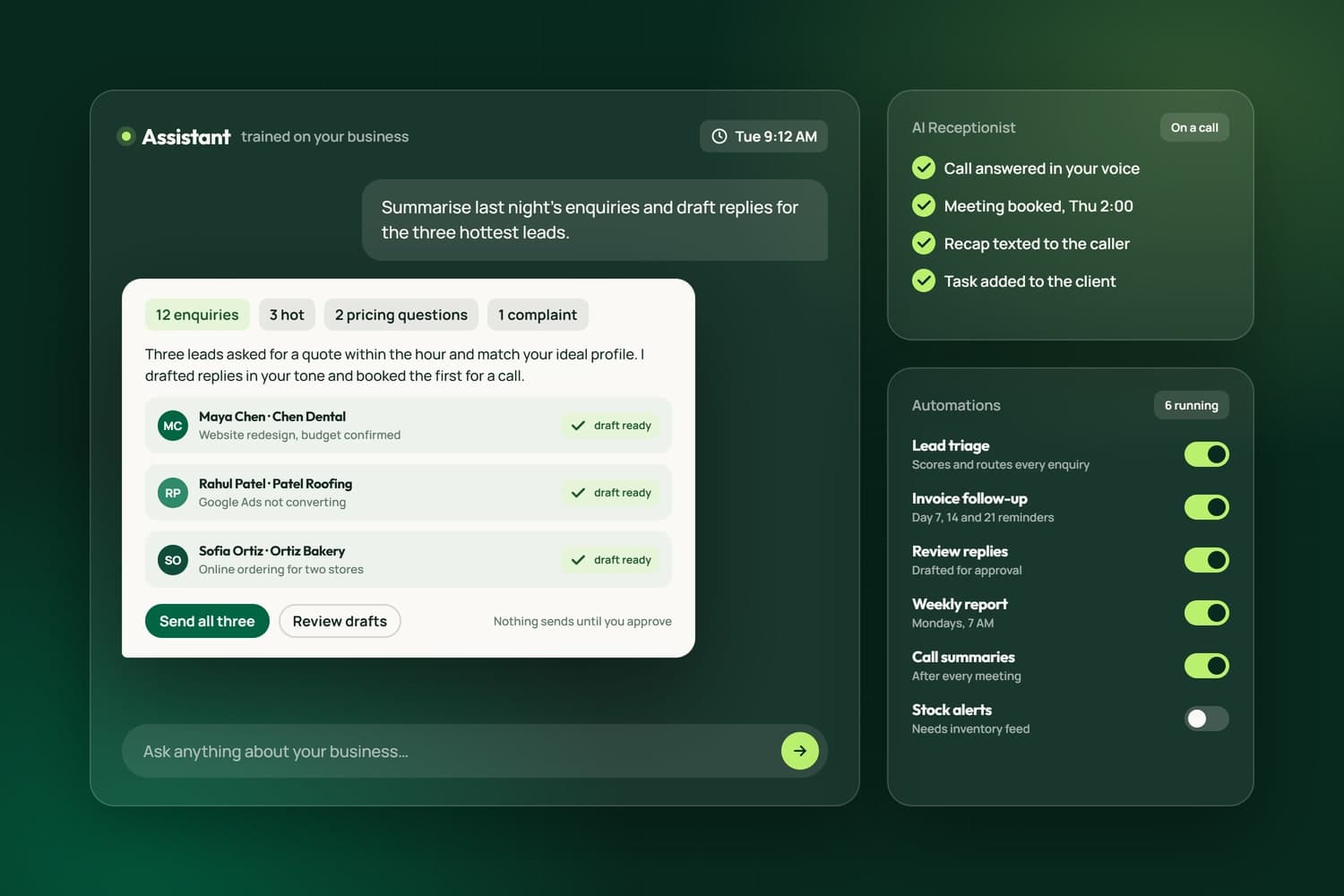
An AI assistant drafting replies for approval, the AI receptionist booking a meeting, and running automations

AI earns its place when it does work you were already paying for. We plan, build and run AI for small and medium businesses in Surrey and across Metro Vancouver and the Fraser Valley: assistants that answer the phone and book meetings, replies drafted in your own voice, business cards and documents read into your records, and the marketing that brings customers in, all run with AI and checked by people.

We do not just advise. We run our own agency on the AI we build, in a client system called NameCRM, and we built iFloor, the software a Richmond flooring store runs on every day. So every recommendation comes from something we have built, shipped and lived with, and every build starts with a plan for where AI helps, where it does not, and how your data stays safe.

What we do with AI

Six ways we put AI to work

AI strategy and readiness

Where AI earns its keep, and where it should not be used.

  • A free AI readiness assessment of how your business actually runs
  • A written roadmap ranked by time saved, money won and risk
  • An honest not yet wherever AI would not pay off
Start the free AI Readiness Check

AI implementation and automation

Assistants, automation and drafting, built into the tools you use.

  • AI receptionists that answer the phone, book and hand off
  • Workflow automation: cards, documents and emails read into your records
  • Replies and proposals drafted in your own voice, from your own records
See NameCRM, with the AI receptionist

AI-powered growth

Marketing that runs on AI and is checked by people.

  • SEO that covers Google and the AI answers people now ask
  • Social content planned, drafted and scheduled with AI
  • Ads built, tested and reported on faster
SEO and AI visibility

AI creative

Brand, imagery and video made with AI, with consent.

  • Brand identities and campaign imagery you own
  • Scene and product imagery generated for your site
  • Anything showing a real person only with that person's yes
Business branding

AI security and governance

Security you can check, not a slogan.

  • A data and privacy review before anything is connected
  • An AI use policy your team can actually follow
  • Guardrails and permissions in every build, and a record of what it sends
How we use AI and handle data

AI training and workshops

Your team using AI well, and safely, from the first week.

  • Hands-on workshops in person across Metro Vancouver, or online
  • Practical daily use of the AI tools you already pay for
  • The rules for client data, written down so everyone follows them
See the AI and social media workshop

Ways to start

Four ways to work with us on AI

  • Free

    AI Readiness Check

    A look at how your business runs, then a written list of where AI pays off first, what it should not touch, and the one pilot worth doing.

    Take the two-minute score
  • Fixed price

    AI Pilot

    One workflow built and run on a slice of real work, with a person in the loop and a result we measure together before anything grows.

    Talk about a pilot
  • Monthly

    AI Advisor

    A standing seat at the table: what to try next, what to switch off, and your tools, rules and team kept current as AI changes.

    Ask about advisory
  • For your team

    AI Workshops

    Hands-on sessions in person across Metro Vancouver or online, built around your own work and the rules for client data.

    Ask about a workshop

You own what we build for you: every account is set up in your name from day one, and the work is yours once the project is paid. NameCRM, our own product, is a subscription.

In engineering terms

What we have built and run in production

The capabilities AI firms list, named plainly, and each one running in our own products today.

Real-time voice agents
Telephony media streams, streaming speech recognition, a large language model and an approved voice in one low-latency loop, with barge-in, warm transfer to a person, recording and a summary of every call.
The receptionist on our line
LLM integration and tool use
Large language models on business API access, calling real tools mid-conversation: booking into a live calendar, finding a meeting spot, texting a recap, opening a task.
Inside NameCRM
Retrieval-augmented generation
Replies and proposals grounded in the client's own records and past messages, retrieved at the moment of writing, so a draft sounds like them and matches what is on file.
Inside NameCRM
Knowledge bases
A business's website and documents distilled into a knowledge base the assistant answers from, which the owner can edit, with a written list of what it must never say.
Inside NameCRM
Document and vision AI
Business cards, signatures, order screenshots, PDFs and photos read by vision models into structured records, checked by a person.
Inside iFloor
Speech and meeting intelligence
Recorded meetings and calls transcribed and summarised, with the promises made in them turned into tasks.
Inside NameCRM
AI evaluation and testing
A synthetic caller that phones the assistant with scripted scenarios, a model that grades every transcript against a rubric, and hundreds of regression checks before each release.
How we test it
Guardrails in code
Rules the model cannot talk its way around: the emergency line spoken by code, prices never quoted, the AI named on every call, output checked before it is said.
Our AI trust page
Workflow automation
Sequences, reminders, follow-ups and hand-offs across inbox, calendar, CRM, accounting and payments, in wording a person approved, with every message logged.
Inside NameCRM
Secure data architecture
A Postgres database in Canada with row-level security, two-step sign-in, a permission check on every server route, and no AI provider training on client data.
Our AI trust page

Pilot first

How an AI project runs

  1. 01

    Assess

    A free look at your website, systems and day, then a written list of where AI helps first.

  2. 02

    Plan

    A roadmap and one pilot, scoped to a result you can measure, with the data it may and may not touch.

  3. 03

    Pilot

    One workflow built and run on a small slice, with a person in the loop, until the results hold.

  4. 04

    Run and grow

    We widen what works, watch it, and keep improving it as the tools improve.

Security you can check

See every service and where it runs
  • AI drafts and a person approves what is written in your name. A phone assistant says it is an AI and follows your rules
  • Business API access from every AI provider, each set so it does not train on your data
  • Your records stay in your own systems, and we tell you which services process data outside Canada
  • Two-step sign-in, a permission check on every server route, and a record of every email, text and call the system sends
  • A security checklist worked before every release

What we have built

AI we built, and run on our own business

These are live in NameCRM, the client system our agency runs on, and in iFloor, the system a Richmond flooring store runs on. Each line is taken from the product itself, and the numbers were counted on the date shown.

graded practice calls for the receptionist
257
scripted call scenarios
46
rules learned from real calls
101
real sent messages behind the drafting voice
638

Counted on September 28, 2026, from the products' own code and test records.

A practice call on September 26, 2026: the AI receptionist says it is an AI assistant, the recap text it sent, and the 257 practice calls behind it
NameCRMA receptionist graded before it speaksA practice call on September 26, 2026: the AI receptionist says it is an AI assistant, the recap text it sent, and the 257 practice calls behind it.Read the case study

In NameCRMThe CRM we built and run our own business on

See NameCRM
  • NameCRM

    257graded practice calls

    A receptionist graded before it speaks

    An AI caller has placed practice calls across scripted scenarios, from angry clients to French speakers and robocalls, and every call is scored by a judge that cites the transcript line before changes reach real callers.

    Read the case study
  • NameCRM

    Books meetings while the caller waits

    The receptionist books, moves or cancels a meeting in the real calendar during the call, and code checks every time against open hours before it is spoken, offering the next slot if one is taken.

  • NameCRM

    Hears French, Hindi, Urdu and Punjabi

    Callers can speak French, Hindi, Urdu or Punjabi and be understood in their own language, with spoken replies in French or Hindi.

  • NameCRM

    Account answers the AI never sees

    A caller already on file can get their invoices and plan texted to the number on file, assembled by code, so the AI never sees a single figure.

  • NameCRM

    638real sent messages it learned from

    Drafts in your own voice

    NameCRM learned its owner's writing from 638 of her real sent messages, and a new voice goes live only when a person approves it. Drafts use the client's whole record and may not invent a meeting, price or date.

  • NameCRM

    AI that cannot change a contract's numbers

    AI rewrites a letter's wording from your notes, and a digit lock restores any clause whose numbers changed, so a price, date or quantity is never altered by the model.

In iFloorThe system a Richmond flooring store runs on every day

See iFloor
  • iFloor

    AI rules the owner approves

    The AI proposes rules from the owner's answers about how the store works, the owner approves or retires each one, and lessons from real jobs count only after a real outcome proves them.

    See iFloor
  • iFloor

    19fields read from one card

    Business cards and order screenshots read for you

    Photograph a business card and AI fills up to 19 fields without touching what staff already typed. Paste a screenshot of an online order and it becomes a draft order for staff to check.

  • iFloor

    A follow-up drafted after every call

    After each recorded call, AI writes the summary and action items onto the customer's record and drafts a follow-up from the job's current facts, and a person reads it and presses send.

See every feature behind our AI Solutions work89 of the 433 live features of NameCRM and iFloor prove this service. The full list opens filtered to them, one sentence each.Browse the 89

Related Services

Explore our related services

All web and marketing services

Answers when you cannot, says it is an AI and books into your calendar. Part of NameCRM.

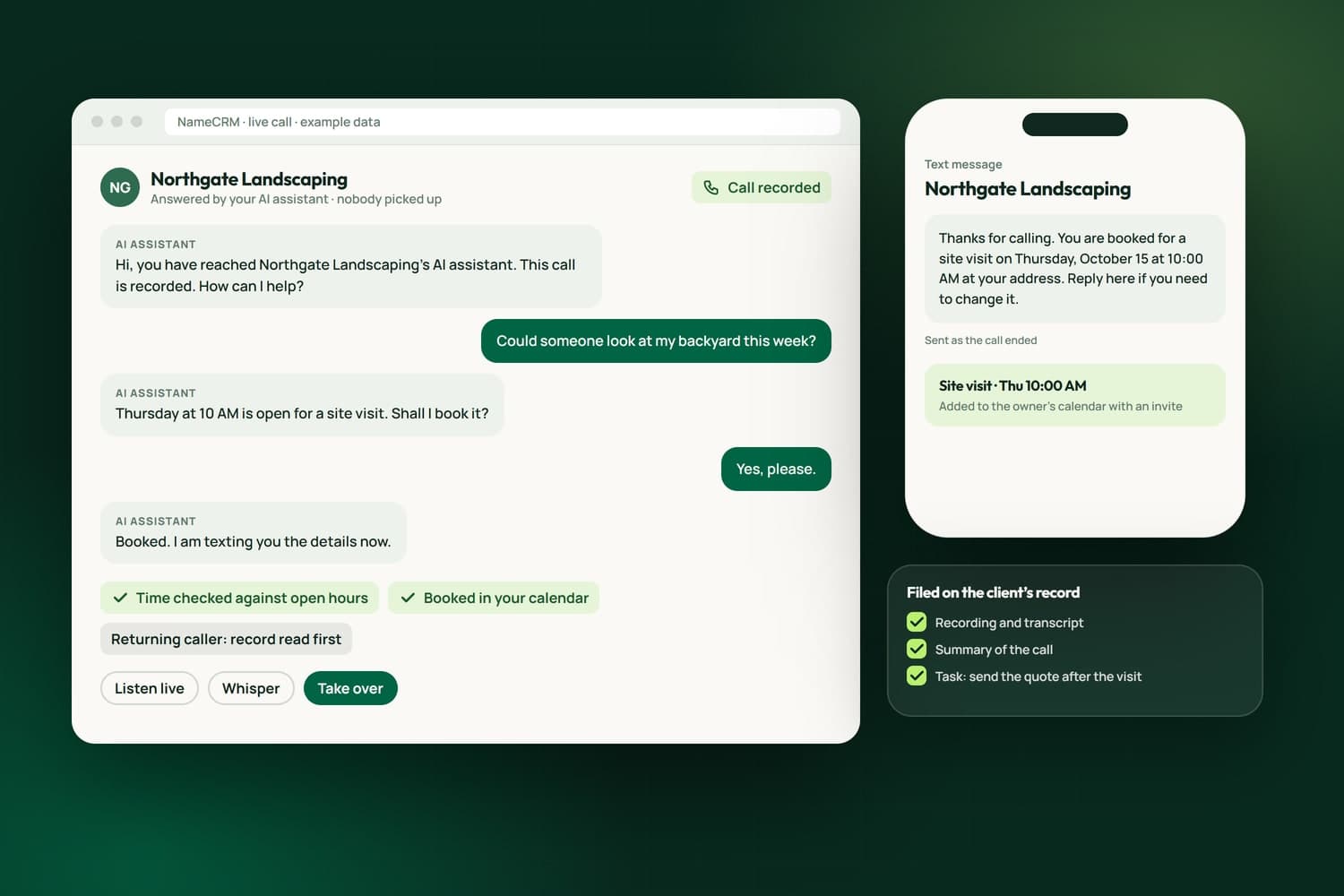
An AI receptionist call with example data: it says it is the business's AI assistant and that the call is recorded, books a site visit after checking the calendar, texts the caller a recap, and files a summary and a task

Custom CRMs with client portals, e-signature, QuickBooks and Stripe built in.

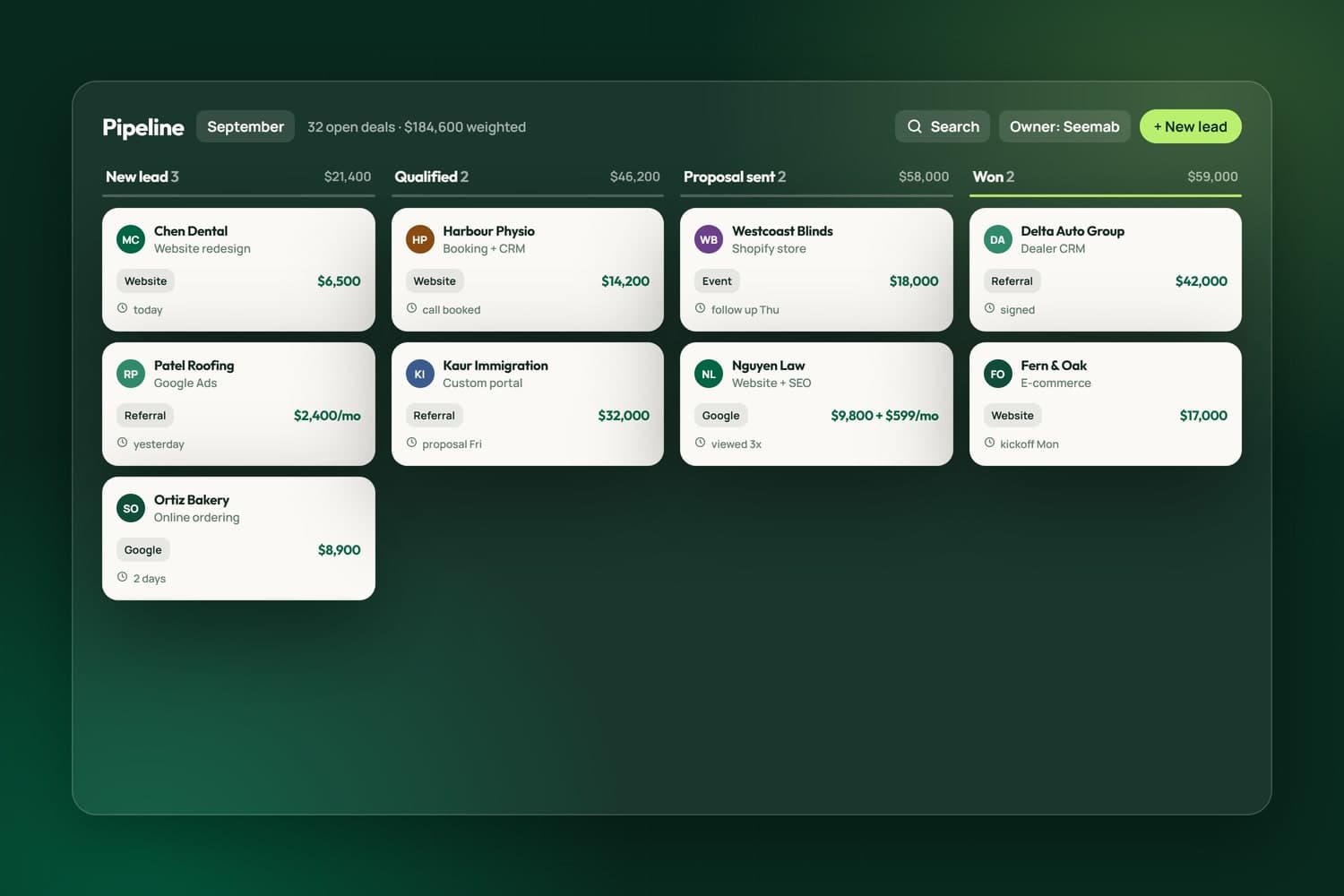
CRM pipeline from lead to won

Areas we serve

AI solutions for businesses in BC and across Canada

We build AI receptionists and automation from Surrey for businesses throughout the Lower Mainland, including Vancouver, Burnaby, Richmond and Langley. The work is done remotely as easily as in person, so we take on AI projects anywhere in British Columbia and Canada.

FAQ's

Frequently asked question

What kind of AI projects do you take on?

Practical ones with a result you can measure: assistants that answer and route calls or messages, reading documents and emails into your systems, drafting in your voice, meeting and call summaries, reporting over your own data, and AI inside your marketing. If a project cannot be measured, we say so before we start.

Where do we start?

With a free AI and website assessment. We look at how your business actually runs, then show you where AI would save time or win work, where it should not be used, and what the first pilot would be. You get the findings in writing.

Is my data used to train AI models?

No. We use business API access and switch off model training with every AI service we connect, keep records in your own systems, and put permissions around every automated action with a record of what it sends. We tell you which providers process data outside Canada, and our AI trust page lists every service we use and where it runs.

How do you keep AI from making mistakes in front of customers?

By designing for it. AI drafts and a person approves what is written in your name. Anything that talks to customers live, like a phone assistant, says it is an AI, runs with clear rules and a hand-off to a person when it is unsure, and every action is logged. We pilot on a small slice first and widen only when the results hold.

Do I need a CRM or custom software already?

No. Many projects start inside tools you already use, such as your inbox, calendar or store. When it makes sense we build the system around it, and our own products, NameCRM and iFloor, show what that looks like.

Where are you based, and which areas do you work in?

We are based in Surrey, BC, and work with small and medium businesses across Metro Vancouver and the Fraser Valley, including Vancouver, Burnaby, Richmond, Langley, Coquitlam and Abbotsford. Most of the work runs online, and we meet in person when it helps.

Do you offer AI training for our team?

Yes. We offer hands-on workshops, in person across Metro Vancouver or online, on practical daily use of the AI tools your team already has, and on the rules for client data. They are built around your own work, so people leave with tasks they can do the next day.

Can I get the AI receptionist on its own?

The receptionist comes with NameCRM, because it books into your calendar, files every call to the right client and turns requests into tasks. NameCRM is opening to other businesses soon; request access to be among the first.

What does an AI receptionist do, and can it answer my business phone?

Yes, it can. An AI receptionist picks up calls when your team cannot, including evenings and weekends. It answers routine questions, takes a message or a booking, and follows the rules you set. When a caller needs a person, it hands the call or the message to your staff. Every call is logged, so you can read what was said.

How much does AI phone answering or AI automation cost for a small business?

Each project is priced by what it has to do: how many call types or tasks it handles, and which systems it connects to, such as your calendar, CRM or phone line. We start with a small pilot so the first spend is limited and the result can be measured. You get a written estimate after the free assessment, with GST added on top. Call 604-900-2060 for pricing, or read how our pricing works.