
NameCRM clients and pipeline: one page per client, and a radar for loose ends
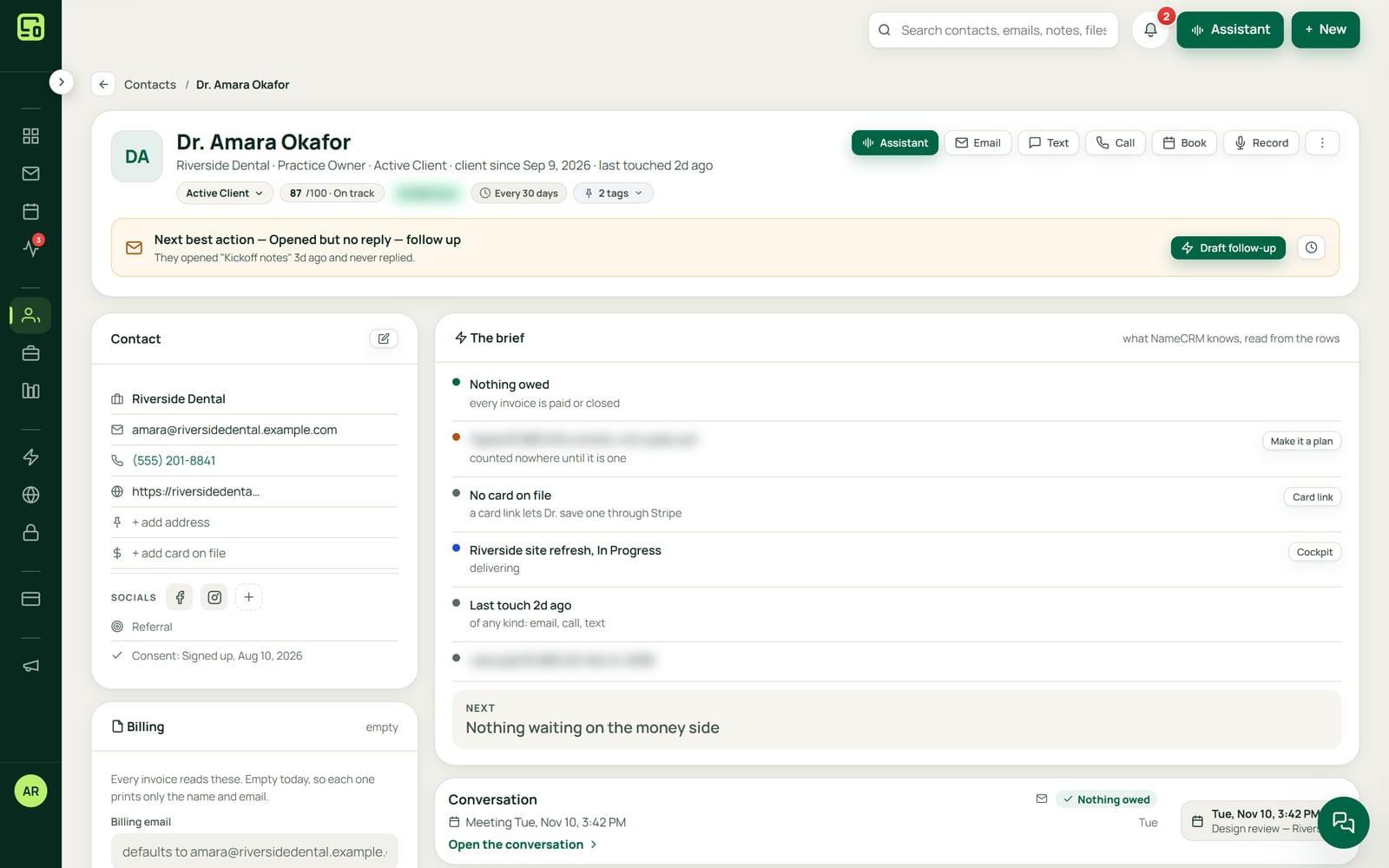
Every client in NameCRM has one page where each email, text, call, meeting, note, file, quote and payment sits on a single timeline. Pipelines, tasks and a radar for loose ends work from the same record, so nobody has to ask where things stand.
In this guide
In short
- What it is: the client records at the heart of NameCRM. One page per client with a full timeline, companies, notes, tasks, pipelines and deals, and an engagements board that places each job by what really happened.
- Who it is for: service businesses that win work through calls, emails and meetings, and lose it when a reply or a promise slips.
- What keeps follow-up honest: a radar for unanswered messages, meeting promises and quiet deals, stay-in-touch reminders that show who is overdue, and churn risk that names its reason.
- Where the data is kept: client records are stored in Canada, in Montreal. The servers that run the application are in the United States, and the AI services it uses run outside Canada too.
- How to get it: NameCRM is not on sale yet. Request access and we will walk you through it on your own work.
How it works
From the first call to a client who stays
One record from every door
Add a client from a call, an email, a website form, a scanned card or by hand, and they get one page. Duplicates are found by email, phone or name, and a merge moves every linked record with an exact undo.
The timeline fills itself
Every email, text, call, meeting, note, file, quote, letter, invoice and payment lands on the client's timeline. Email opens, portal visits and signed letters join one live stream for each client and one for the whole business.
Deals you drag, jobs that move on evidence
Run several pipelines with deals dragged between stages. The engagements board places each client after the furthest thing that really happened, such as a signed letter or a paid deposit, so nobody types a stage by hand.
Promises become tasks
Tasks carry due times, repeat on a schedule and attach to deals, projects and meetings. Tasks come from calls and meetings too, so a promise made on the phone becomes a task without retyping, and My Day gathers what is yours today.
Nothing slips past
The radar lists messages unanswered for more than 24 hours on any channel, meeting promises from the last 30 days and deals nobody has touched in 10 days. Stay-in-touch reminders and churn risk show who has gone quiet, and why.
Call while they read
The bell rings when a client replies, or has spent a minute reading a quote or letter you sent, and again when they come back to it. Everyone who texted, emailed, called or wrote in their portal sits in one list, and whoever waits on an answer shows first.
An example
A backyard redesign, from the first call to next spring
Jas runs a small landscaping company. A homeowner named Erin calls about a backyard redesign, and Jas saves her as a contact while they talk. He adds a deal to his landscaping pipeline and drags it to the stage for a booked site visit.
After the visit he writes a note with the measurements and pins it to her page, then sets a task to send the design by Friday. That evening he brings in his old client spreadsheet. Erin hired him once years ago, and the duplicate finder spots her twice, matched by phone number. He merges the two with an exact undo, and her old job joins her new timeline.
Jas sends the design and the quote, then gets on with his day. That night the bell tells him Erin has spent a minute reading the quote, and the next morning that she came back to it. He calls while she has it open, and they settle on the patio stone.
Erin signs the agreement and pays the deposit. Her job moves across the engagements board by itself, first to signed, then to deposit paid, because each move follows something that really happened. Jas never types a stage, and the board cannot disagree with his records.
In the fall the radar shows him a question from another client, unanswered for more than 24 hours, and he answers it before lunch. He sets Erin to be called every few months. Next spring she slips past it, and her churn risk line gives the plain reason: no reply in 45 days. One tap opens a draft to get back in touch.
The names in this example are made up.
Every feature
Everything clients and pipeline do today
Each card is one feature, in the words of NameCRM's own feature records. Live means it runs every day in our own agency; NameCRM is not on sale yet.
Your clients, deals and follow-up
One page per client
Every client has one page where every email, text, call, meeting, note, file, quote, letter, invoice and payment sits on a single timeline, so nobody has to ask where things stand.
What sets it apartMost CRMs stitch email and billing in through add-ons; here every channel and every dollar is native to the same record.
The activity net
Every touch a client makes, from opening an email to visiting their portal or signing a letter, lands in one live stream per client and one for the whole business.
What sets it apartPortal visits, letter views and email opens share one stream with calls and texts instead of living in separate apps.
Pipelines and deals
Run several sales pipelines with deals as their own records carrying value and stage, dragged between stages, and switch the whole module off if a business does not sell that way.
What sets it apartThe pipeline is a switchable module; turning it off hides every door and keeps the data.
A board that moves on evidence
The engagements board places each client after the furthest thing that really happened, such as a signed letter or a paid deposit, so a stage is never typed by hand and retainers run on their own track.
What sets it apartStages are derived from real records, so the board cannot disagree with the data.
Stage playbook
Ten per-stage work boards tell you the next job for every engagement, from first lead through requirements, letter, build, delivery and recurring care.
What sets it apartThe pipeline tells you what to do next, not only where a deal sits.
Project cockpit
Each project has a cockpit showing its estimate, engagement letter, deposit, milestones, installment plan and every monthly fee, each one ready to be billed from the same screen.
What sets it apartThe agreed scope, the contract and the billing share one screen and one set of numbers.
Tasks and My Day
Tasks carry due times, repeat on a schedule, move across a To do, Doing and Done board, attach to deals, projects and meetings, and gather into a My Day list.
What sets it apartTasks are created automatically from calls and meetings, so promises become tasks without retyping.
The missed-anything radar
A radar lists every inbound message unanswered for more than 24 hours on any channel, meeting promises from the last 30 days and open deals nobody has touched in 10 days.
What sets it apartIt watches email, texts, calls and meeting promises together, which single-channel tools cannot.
Churn risk with reasons
At-risk clients are listed with the plain reason, such as no reply in 45 days, no meeting in 90 or no payment in 45, and one tap opens a re-engagement draft.
What sets it apartEvery risk flag shows its reason instead of an opaque score.
Duplicate finder and safe merge
Duplicates are found by email, phone or name, and a merge moves every linked record in the database itself with an exact undo, so merging never loses a client's history.
What sets it apartThe merge runs inside the database across every table that points at a contact, not in the browser.
Who opened which link
NameCRM shows who opened a link you sent, from which message, how many times, and on which of their devices, right on their profile.
What sets it apartLink opens are tied to the exact text or email that carried them.
A bell grouped by person
The bell groups texts, emails, missed calls and voicemails by person, pops up what is new, catches you up on what came in while you were away, and what you read clears on every device, for you alone.
What sets it apartRead marks are personal, so one teammate opening a chat never clears it for another.
Money and deadlines on every engagement
Engagement cards show what was paid of what was agreed, the next payment, the monthly fee and the days to a set deadline, amber within a week and red when late, and a Table lists them all with filters.
What sets it apartThe board, its Table and Billing read one money ledger, so they cannot disagree.
Client page opens on the brief
A client's page opens on a short brief with the one money step that matters next and a billing panel that every invoice reads from.
Stay-in-touch cadences
Set how often you should speak to each person and NameCRM shows who has slipped past it, with one definition of overdue used everywhere.
Know when a client is reading
The bell rings when a client replies, when they have spent a minute reading a letter or quote you sent, and again when they come back to it after 30 minutes away, so you can call while they read.
Bulk actions, inline edit and columns
Select many contacts for one action, edit any cell in place with an instant rollback if the save fails, and choose which columns the table shows.
Companies as records
Companies are records of their own, linked to their people, deals, files and notes.
Notes as a timeline
Notes are first-class records on contacts, deals and companies, shown as a timeline with attachments and pinning.
Command palette and search
Ctrl or Cmd K reaches every person, page and action, and the header search finds words inside emails, texts, notes, deals and files, grouped by type.
Mappable keyboard shortcuts
Keyboard shortcuts can be remapped in Settings, and they never fire while you are typing an email.
Your own lead sources
You define where leads come from, and every report and score uses your list rather than a generic one.
Your brand in the app
Your accent colour, logo and business name run through the whole app, with in-app help, a feedback button and a what's new panel.
Settings in one rail
Settings is a rail of sections on one page rather than one long scroll of forty cards.
One conversation per person
Everyone who texted, emailed, called or wrote in their portal sits in one list with one timeline each; whoever waits on an answer shows first with how long, gets an AI reply drafted when opened, and the bell lists them.
Never signed is deleted, signed is cancelled
From the board, the Table or its page, an engagement that was never signed can be deleted and its sign link stops, while a signed or running one is cancelled instead, keeping its records.
Lead score and client health
Each client gets a score out of 100 from weights you control, such as staying in touch, replies, money on the table and depth of work, plus a health scale that actually separates clients.
What sets it apartThe owner sets the weights, and reply intent from AI can be added as an optional factor.
AI lookalike finder
An optional AI pass looks only at names and companies to group likely duplicates spelled two ways, and nothing is changed until you review and merge.
What sets it apartThe AI sees names and companies only, never emails, notes or money.
Important dates
Birthdays, anniversaries and renewals surface before they pass, each with a one-click AI greeting drafted for you to review.
Limits
What it does not do yet
WhatsApp, Messenger and Instagram messages are not connected yet. The one list of conversations holds texts, emails, calls and portal messages.
Email comes from Microsoft 365 only. Gmail is not supported yet, so a Gmail mailbox cannot fill the timeline.
NameCRM is built for British Columbia first, on Pacific time with BC statutory holidays. Other regions come later.
FAQs
Questions about clients and pipeline in NameCRM
Can I bring my existing contacts into NameCRM?
Yes. A CSV import maps your columns, previews duplicates and never deletes anything. After that, the duplicate finder checks by email, phone or name, and a merge moves every linked record inside the database with an exact undo, so two copies of one client become one page without losing any history.
Do I have to use deals and a sales pipeline?
No. The pipeline is a module of its own, and an owner or admin can switch it off in Settings if the business does not sell that way. Every door to it is hidden and its data is kept, so switching it back brings everything back. Client pages, tasks, notes and the timeline work the same without it.
How does NameCRM stop follow-ups from slipping?
A radar lists every message left unanswered for more than 24 hours on any channel, promises made in meetings in the last 30 days and open deals nobody has touched in 10 days. Stay-in-touch reminders show who is overdue, and churn risk names the plain reason, with a re-engagement draft one tap away.
What do clients and pipeline cost in NameCRM?
Client records, the timeline and the pipeline come with NameCRM, and NameCRM is not on sale yet. Request access and we will walk you through it on your own work. Pricing is set with you after that walkthrough, because every business is set up differently. To talk it through now, call 604-900-2060.
Can you build a CRM like this for my own business?
Yes. Nametech Canada builds custom CRMs for other businesses, using the same work that made NameCRM. Start with a free 30-minute assessment, and we will tell you what your client records, pipeline and follow-up would need, and which of your tools the new system should connect to.
Custom software
Want client records and a pipeline in your own system?
Any of these features can also be custom built into a new system for your business, by the team that made NameCRM. Start with a free 30-minute assessment.
Other parts of NameCRM
- Lead capture and website assessments
- Email and AI drafting
- Texting and business phone
- Calendar, booking and meetings
- Quotes, letters and e-signature
- Invoices, payments and QuickBooks
- Client portal and files
- Newsletters and campaigns
- Reports and dashboard
- Mobile app and team chat
- Integrations
- AI receptionist
- Security