
NameCRM dashboard and reports: what needs you today, and what your numbers really say
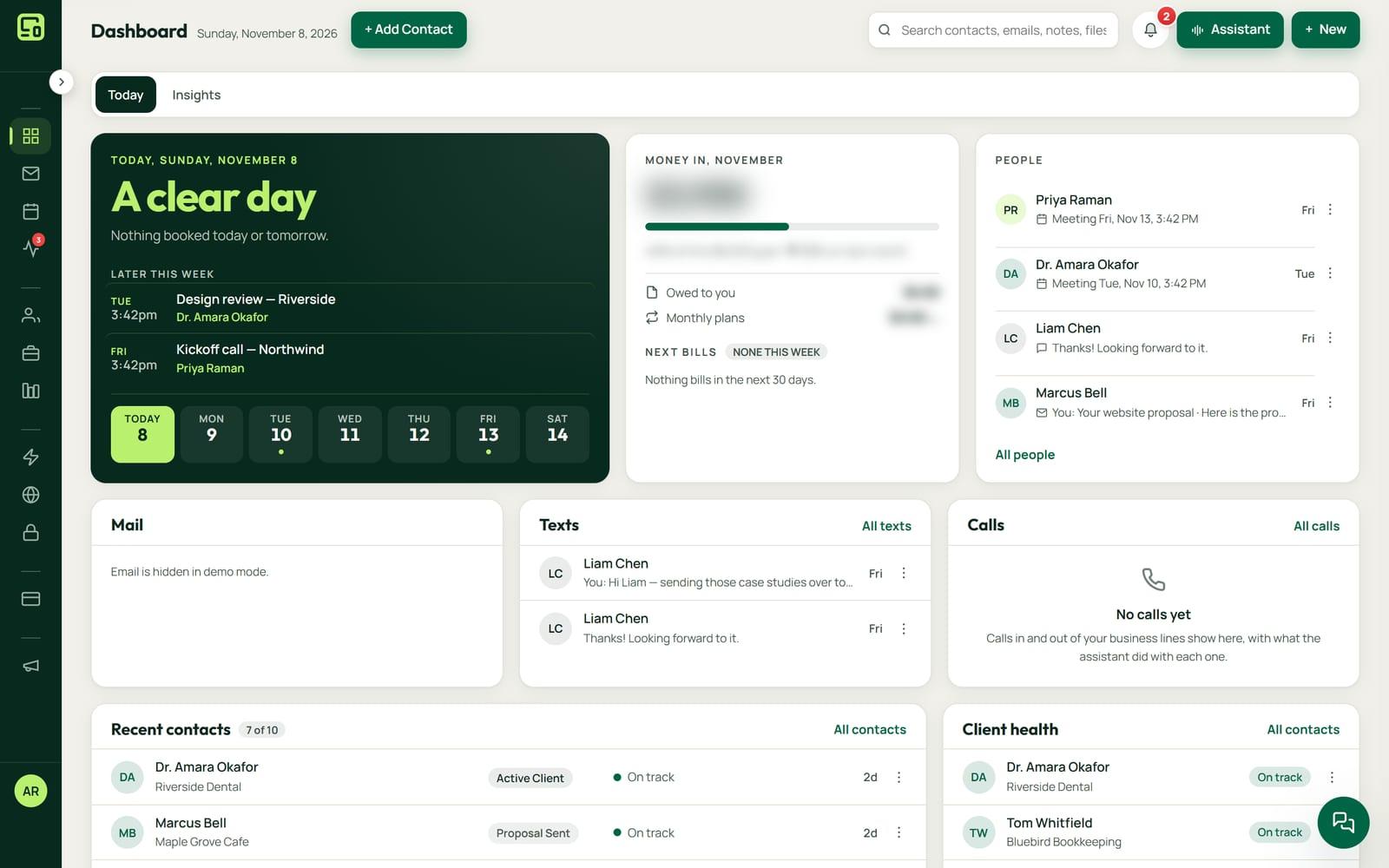
NameCRM's dashboard opens on your day: meetings, tasks, who is due and yesterday's opens and replies. Its reports show revenue, lead sources, the funnel and a forecast from your own records, and never invent a figure.
In this guide
In short
- What it is: the dashboard and reports inside NameCRM. A Your Day card, an AI briefing that ranks what needs you, next best actions, revenue and source reports, a forecast, goals with pace and a weekly review.
- Who it is for: owners of small service businesses who want to know each morning who needs them, and whether an event or a lead source was worth it.
- What makes it different: every figure comes from your own records. The AI ranks facts the CRM supplies and cannot add new ones, and the source report says so when there is not enough data.
- Where the data is kept: client records are stored in Canada, in Montreal. The servers that run the application are in the United States, and the AI services it uses run outside Canada too.
- How to get it: NameCRM is not on sale yet. Request access and we will walk you through it on your own work.
How it works
A morning, a week and a quarter with the dashboard
Your day on one card
The Your Day card lists today's appointments and tasks, who is due, important dates, and yesterday's opens and replies. At 8 each morning your phone gets one line counting the people waiting on a reply, tasks due or overdue and today's meetings, and nothing on a day with nothing.
A briefing that ranks and never invents
NameCRM gathers who is due, churn risks, stalled deals, meetings and recent opens. AI puts them in order with a reason for each and filters out anything it made up. Each client's next best action comes from their real history and opens a draft.
Goals with a pace you can see
Set quarterly and annual revenue goals, and weekly targets for touches and meetings, and the dashboard shows your pace against each one. The forecast weighs open deals by the month each is expected to close, into best, likely and worst cases.
Reports from one set of records
Revenue over time, by service and by source, the conversion funnel and activity volume all use one definition of the date window. You define where leads come from, so every report and score uses your list rather than a generic one.
Whether an event was worth it
Each event gets its own report page, and the source report turns the question of whether an event was worth it into a number, saying honestly when there is not enough data. Any report prints to PDF or exports to CSV.
A written week and the best hour to send
Every Sunday, facts from the database such as wins, revenue, stalled deals and cold contacts become a short written review. A weekday by hour heatmap shows when your emails get opened, and the busiest hour becomes a one-click send time.
An example
A cleaning company's Monday, and the home show question
Lena runs a small home cleaning company. At 8 am her phone shows one line: a few people waiting on a reply, the tasks due today and her one meeting.
At her desk the Your Day card shows a walkthrough with a new client at 10:30, two tasks, a regular client who is past her stay-in-touch date, and a birthday. The briefing ranks the same facts with a reason each. The regular client sits near the top as a churn risk: no reply in 45 days. Lena opens the next best action, edits the draft it opens and sends it.
In May she paid for a booth at a home show, and every card she scanned there carries the show as where they met. In September she opens the show's own report page. The source report turns her question, was it worth it, into a number. For a smaller fair she tried, it says plainly that there is not enough data yet.
Her quarterly revenue goal sits on the dashboard with her pace against it, beside her weekly targets for touches and meetings. The forecast weighs her open deals by the month each should close, into best, likely and worst cases, and she prints the quarter's revenue report to PDF for her bookkeeper.
Before her fall newsletter she checks the heatmap of when her emails get opened, and the busiest hour becomes a one-click choice in the scheduler. On Sunday the weekly review sums up her wins, revenue, stalled deals and cold contacts in a short written note.
The names in this example are made up.
Every feature
Everything the dashboard and reports do today
Each card is one feature, in the words of NameCRM's own feature records. Live means it runs every day in our own agency; NameCRM is not on sale yet.
Your dashboard and reports
AI daily briefing
The CRM gathers who is due, churn risks, stalled deals, meetings and recent opens, and AI only ranks them with a reason each, filtering out anything it invented.
What sets it apartThe AI ranks facts the CRM supplies; it cannot add new ones.
Weekly review
Every Sunday, facts from the database such as wins, revenue, stalled deals and cold contacts become a short written review of the week.
Next best action
The dashboard suggests the next best action for each client from their real history, and each action opens a draft.
Reports that never invent money
Revenue over time, by service and by source, the conversion funnel and activity volume use one definition of the date window and never invent a figure.
Was that event worth it
Source ROI turns a question like was that event worth it into a number, and says honestly when there is not enough data.
Forecast
The open pipeline is weighted by expected close month into best, likely and worst cases.
Goals with pace
Quarterly and annual revenue goals plus weekly touch and meeting targets show your pace against target on the dashboard.
Best time to send
A weekday by hour heatmap shows when your emails get opened, and the busiest hour becomes a one-click best time in the scheduler.
Event reports and exports
Each event gets its own report page, and any report prints to PDF or exports to CSV.
Your Day card
A Your Day card lists today's appointments, tasks, who is due, important dates and yesterday's opens and replies.
- Built for our own business card
QR and portal analytics
The dashboard shows QR scans, the booking funnel and taps on each button of the digital business card portal.
Morning summary on your phone
At 8 each morning the bell and your phone give one line counting the people waiting on a reply, the tasks due or overdue and today's meetings, and nothing comes on a day with nothing.
Limits
What it does not do yet
The source report needs enough contacts from a source to give a number. With too few, it says there is not enough data instead of guessing.
The QR scans and button taps on the dashboard come from our own digital business card today, not from a card of yours.
NameCRM is built for British Columbia first, on Pacific time with BC statutory holidays. Other regions come later.
FAQs
Questions about the NameCRM dashboard and reports
What is on the NameCRM dashboard?
A Your Day card with today's appointments, tasks, who is due, important dates and yesterday's opens and replies; an AI briefing that ranks what needs you, each with a reason; a next best action for each client that opens a draft; and your revenue goals and weekly targets, with your pace against each.
Does the AI make up numbers in NameCRM reports?
No. The CRM gathers the facts itself: who is due, churn risks, stalled deals, meetings and recent opens. AI only puts them in order with a reason for each, and anything it invented is filtered out. Revenue and source reports use one definition of the date window and never invent a figure.
Can I export NameCRM reports?
Yes. Any report prints to PDF or exports to CSV, and each event gets its own report page. Separately, one click exports your contacts, companies, deals, payments, tasks, notes and other records as a zip of spreadsheet files, with a list of your files.
What do the NameCRM dashboard and reports cost?
The dashboard and reports come with NameCRM, and NameCRM is not on sale yet. Request access and we will walk you through it on your own work. Pricing is set with you after that walkthrough, because every business is set up differently. To talk it through now, call 604-900-2060.
Can you build a dashboard like this for my own business?
Yes. Nametech Canada builds custom CRMs and business systems with dashboards and reports for other businesses, using the same work that made NameCRM. Start with a free 30-minute assessment, and we will tell you which numbers your dashboard should show and which of your tools it should read them from.
Custom software
Want a dashboard like this in your own system?
Any of these features can also be custom built into a new system for your business, by the team that made NameCRM. Start with a free 30-minute assessment.
Other parts of NameCRM
- Clients, pipeline and follow-up
- Lead capture and website assessments
- Email and AI drafting
- Texting and business phone
- Calendar, booking and meetings
- Quotes, letters and e-signature
- Invoices, payments and QuickBooks
- Client portal and files
- Newsletters and campaigns
- Mobile app and team chat
- Integrations
- AI receptionist
- Security