
NameCRM quotes, letters and e-signature: price the work once, and the signed copy files itself
Price the work once and NameCRM carries the same numbers into the quote, the engagement letter, the invoice and the PDF. Clients choose from up to four options, accept online, and sign on a private page or inside their portal.
In this guide
In short
- What it is: quotes with up to four options and add-ons, engagement letters built from per-service templates, and e-signature on a private page or inside the client's portal, all priced by one calculation.
- Who it is for: service businesses that quote a job, agree the terms in writing, then bill a deposit, installments or a monthly fee.
- How clients use it: on any phone, they pick an option and any add-ons, accept by typing their name, and sign by drawing or typing it.
- Where the data is kept: client records and files are stored in Canada, in Montreal. The servers that run the application are in the United States, and the AI that rewrites letter wording runs outside Canada too.
How it works
From a price to a signed agreement
Price it once
Build a package in Estimate Studio: line items that describe the scope, a discount as a target price, an amount or a percent, tax on top or included, and an installment plan. One calculation then feeds the quote, the letter, the invoice and the PDF.
Send a quote with choices
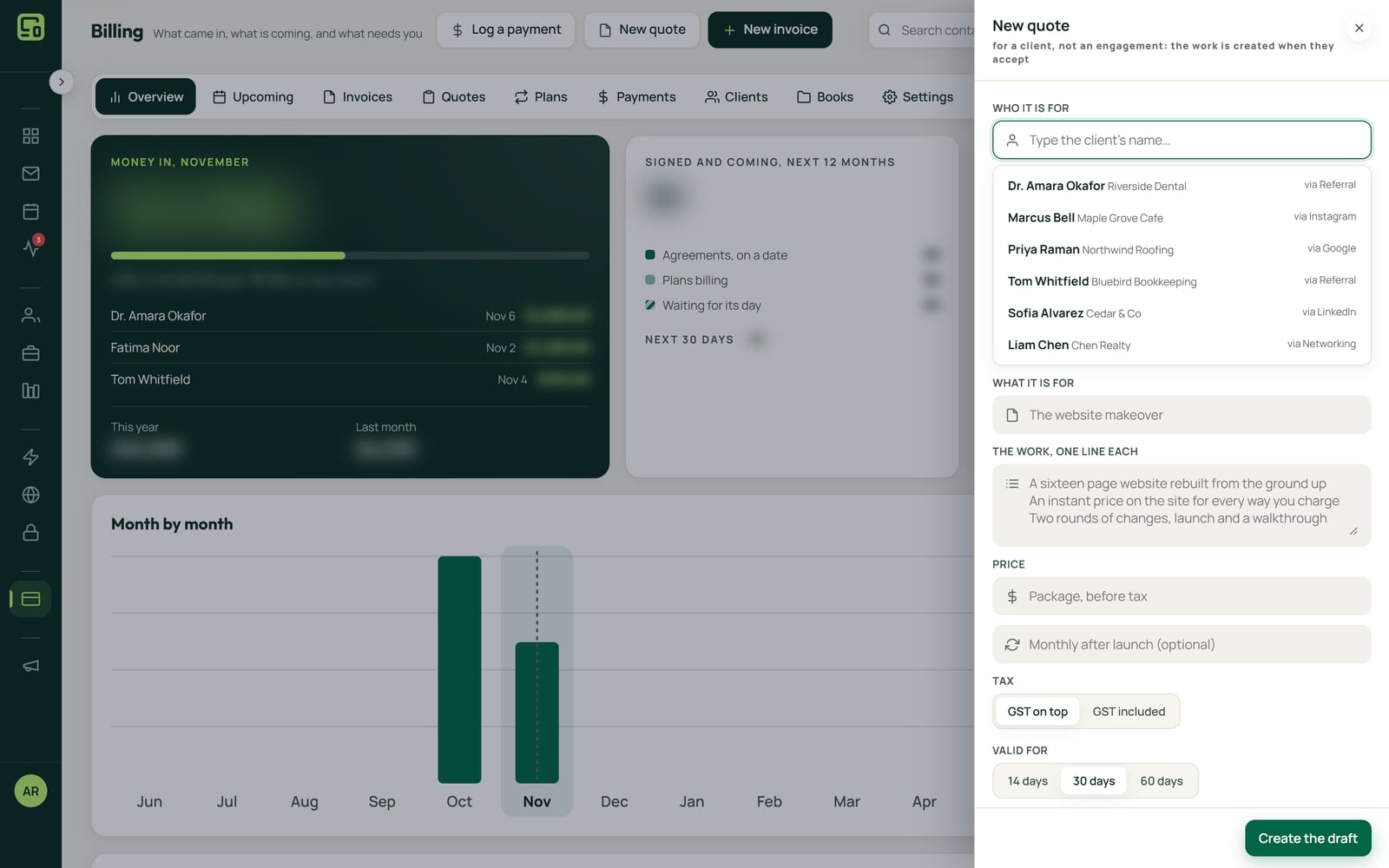
Offer up to four options, each priced on the server with tax, a deposit and an optional monthly fee, plus add-ons the client can tick. A quick quote for any client can start from Billing, and it stays a draft until you tick how it is delivered.
See what they read
NameCRM shows which sections of the quote the client read and for how long, so you know whether they reached the price or the terms. A quote or letter is marked viewed only when the client opens it, never when you preview it.
They accept, and the deposit is invoiced
The client accepts online by typing their name, with the time and IP recorded. Acceptance raises the deposit invoice, drafts the balance and tells you, and the option they picked becomes the money everywhere after.
The letter fills itself in
The engagement letter is built from per-service templates and the project's own facts. AI can rewrite the wording from your intake notes, a digit lock restores any clause whose numbers changed, and an unfilled placeholder blocks sending. Send names the person first.
Signed, sent and filed
The client signs on a private page or inside their portal. Both sides get the PDF with the next step, the signed copy is filed on the client's record and in their portal files, and any older letter on that engagement closes.
An example
A backyard job with monthly care, from quote to signature
Hana runs a small landscaping company in Langley. A homeowner named Marco wants his backyard redone and someone to look after it afterwards. Hana prices the job in Estimate Studio and sends a quote with a few options: a new patio, a patio with planting, or the whole yard, each with a deposit and an optional monthly care fee. Lighting is an add-on he can tick.
Marco opens it on his phone that evening. He ticks the lighting and types a question in the box: can the patio wait until the ground dries? In the morning Hana can see he spent his time on the price and the terms, so she answers the question and leaves the price alone.
Marco accepts the patio with planting by typing his name. NameCRM records the time and his IP, raises the deposit invoice, drafts the balance and tells Hana. The price he picked is now the price on every page that follows.
Next comes the agreement. Hana's templates for the landscaping and for the monthly care merge into one letter, filled from the job's own facts. She asks the AI to smooth the wording from her intake notes, and where a reworded clause came back with a different date, the digit lock put the original back. Her own preview leaves the letter marked not viewed. When she presses Send, it names Marco first and waits a beat.
Marco reads it and asks to start the care plan a month later. Hana revises the sent letter: his old link pauses and says the agreement is being updated, so that version can never be signed, and the new link reaches him by email and text. He signs inside his portal. Both of them get the signed PDF with the next step, and the copy is filed on his record and in his portal files.
The names in this example are made up.
Every feature
Everything quotes, letters and signing do today
Each card is one feature, in the words of NameCRM's own feature records. Live means it runs every day in our own agency; NameCRM is not on sale yet.
Pricing the work and writing the agreement15 features
Per-section read time
NameCRM shows which sections of a quote the client read and for how long, so you know whether they reached the price or the terms.
What sets it apartSection-level read time is uncommon outside dedicated proposal software.
Estimate Studio
Build fixed-price packages whose line items describe scope, with discounts as a target price, an amount or a percent, tax on top or included, and installment plans.
One calculation everywhere
One money calculation feeds the estimate, quote, letter, invoice and PDF, so the price a client agreed can never appear differently anywhere else.
Quotes with up to four options
A quote can offer up to four options, each priced on the server with tax, deposit and optional monthly fee, and the one the client picks becomes the money everywhere.
Add-ons and a question box
Clients tick optional add-ons on the quote page and ask a question in a box that reaches you, on any phone.
Accept online, deposit invoiced
A client accepts a quote online by typing their name, recording time and IP, and acceptance raises the deposit invoice, drafts the balance and tells you.
Quote PDF and revisions
Quotes print as a branded PDF with tax facts, and Revise publishes a new numbered quote that replaces the old one while keeping it on file.
Quick quotes for any client
A quote can be written for any client from Billing without a project, and stays a draft that reaches nobody until you tick how it is delivered.
Engagement letters from templates
Engagement letters are built from per-service templates filled from the project's own facts, and several services can merge into one letter.
Letter versions
Every letter keeps its earlier versions with one-click restore.
Server-built letter PDF
Letters render as a real server-built PDF with page breaks, the company mark, installment plans and a counter-signature block stamped once signed.
- Our agency's own letter standard
Letters that protect you
Every letter template says what is included, states that anything not listed is not, and carries the protections without promising response times or cadences.
Money already paid stays paid
When a client paid before the agreement, their payment plan can carry that money as received, so they are never asked or invoiced for it again and their next payment settles the next row.
Agreements go to the right person
Before an agreement goes out, Send names the person it goes to and waits a beat, and warns first when the letter just appeared or the list just changed, so you catch a wrong name before it goes.
AI wording with numbers locked
AI rewrites a letter's wording from your intake notes, a digit lock restores any clause whose numbers changed, and unfilled placeholders block sending.
What sets it apartAI can polish a contract but cannot alter a price, date or quantity.
Getting it signed and filed7 features
Sign on a private page
Clients sign on a private page by drawing or typing their name and agreeing, with time and IP recorded and double signing blocked.
What sets it apartReplaces a separate e-signature subscription.
Revise a sent agreement
A sent agreement that is not signed yet can be revised: the client's old link pauses and says it is being updated, so the old version can never be signed, and the new link goes by email and text.
What sets it apartThe sent text is never edited: each revision is a new version, and the earlier one is kept.
Sign inside the portal
The agreement opens framed inside the client's portal and is signed without leaving it, and only NameCRM and the portal may frame it.
Signed copy with the next step
Once signed, both sides get the PDF plus the next step: pay the first month, view the paid invoice, open the portal, or book a call in one click.
Signed copy filed and shared
The signed PDF is filed on the client's record and shared into their portal files, and staff can resend it.
Viewed means the client
A letter or quote is only marked viewed when the client opens it, never when you or your staff preview it, and a draft is never viewed.
Signing closes the older letter
When a client signs, any older letter on that engagement closes by itself and stops asking them to sign in their portal, and you get a notice.
Limits
What it does not do yet
A signed agreement is never revised. Revise works only on a letter that has been sent and is not signed yet.
Signing happens on NameCRM's own page or inside the client's portal. It does not connect to DocuSign or another e-signature service today.
A quote offers four options at most.
NameCRM is built for British Columbia today, with GST handled on top and Pacific time. Other regions come later.
FAQs
Questions about quotes, letters and e-signature in NameCRM
What is recorded when a client signs in NameCRM?
The client signs on a private page or inside their portal by drawing or typing their name and agreeing. NameCRM records the time and IP and blocks a second signature. Both sides then get the signed PDF, and the copy is filed on the client's record and shared into their portal files.
Can a client choose between options on one quote?
Yes. A quote can offer up to four options, each priced on the server with tax, a deposit and an optional monthly fee. The client can also tick optional add-ons and ask a question in a box that reaches you. The option they pick becomes the money everywhere after.
Can the AI change the price or a date in my agreement?
No. AI can rewrite a letter's wording from your intake notes, but a digit lock restores any clause whose numbers changed, so a price, a date or a quantity stays as you set it. A letter with an unfilled placeholder cannot be sent, and nothing goes out until a person presses Send.
What if I need to change an agreement I already sent?
If it is not signed yet, revise it. The client's old link pauses and says the agreement is being updated, so the old version can never be signed, and the new link goes to them by email and text. Every letter keeps its earlier versions, with one-click restore.
What do quotes and e-signature in NameCRM cost?
Quotes, letters and e-signature come with NameCRM, and NameCRM is not on sale yet. Request access and we will walk you through it on your own work. Pricing is set with you after that walkthrough, because every business is set up differently. To talk it through now, call 604-900-2060.
Can you build a quote tool with e-signature for my own business?
Yes. Nametech Canada builds quote tools and e-signature into custom systems for other businesses, using the same work that made NameCRM's quotes and letters. Start with a free 30-minute assessment, and we will tell you what your quotes and agreements would need and which of your tools they should connect to.
Custom software
Want quotes and e-signature in your own system?
Any of these features can also be custom built into a new system for your business, by the team that made NameCRM. Start with a free 30-minute assessment.
Other parts of NameCRM
- Clients, pipeline and follow-up
- Lead capture and website assessments
- Email and AI drafting
- Texting and business phone
- Calendar, booking and meetings
- Invoices, payments and QuickBooks
- Client portal and files
- Newsletters and campaigns
- Reports and dashboard
- Mobile app and team chat
- Integrations
- AI receptionist
- Security