
NameCRM texting and business phone: every text, call and voicemail on the client's record
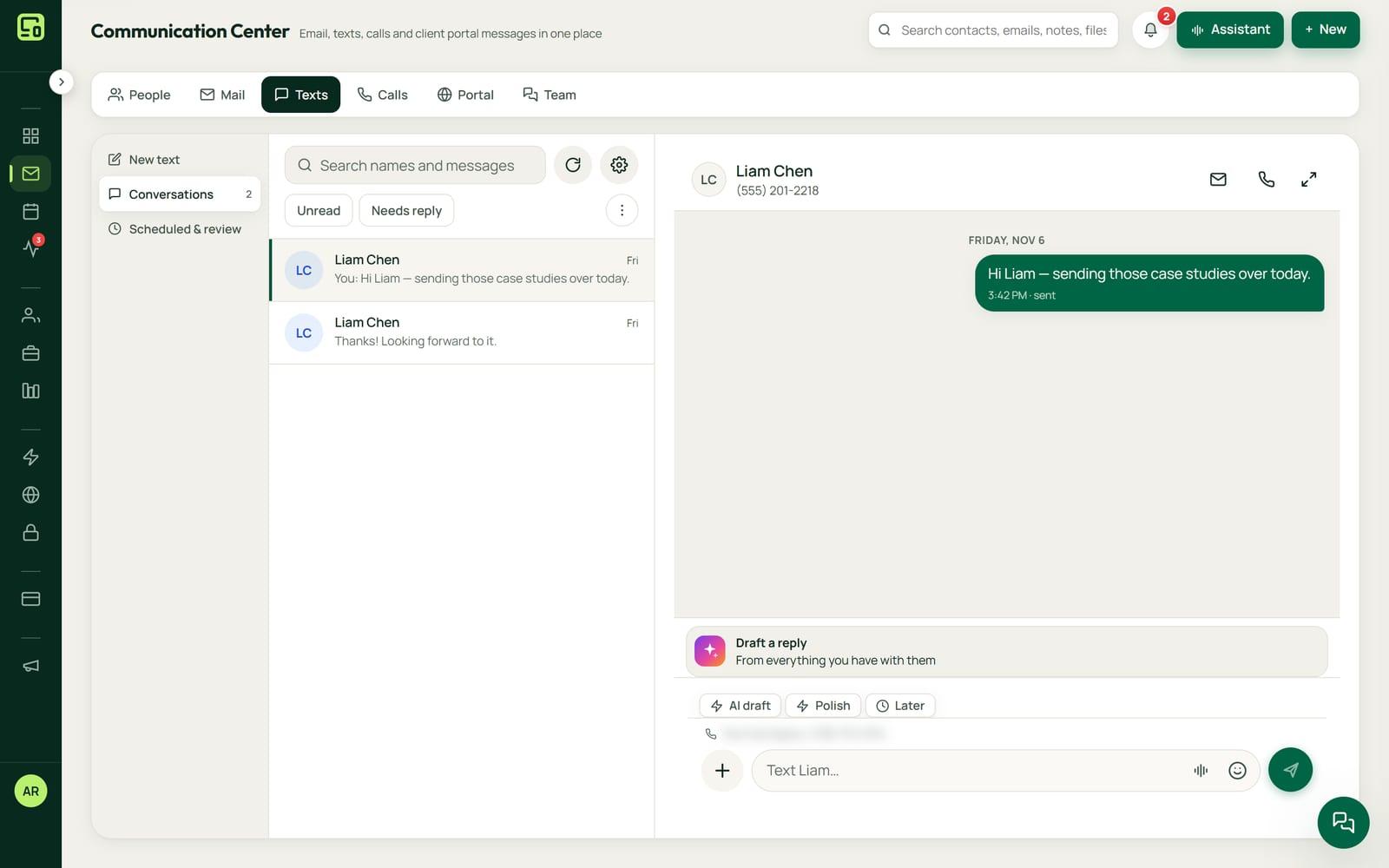
Texts and calls with your clients live on their record in NameCRM, not on someone's personal phone. Your business number rings every open NameCRM browser and app and your cell together, and answered calls are recorded, transcribed and summarized onto the client's timeline.
In this guide
In short
- What it is: two-way texting with picture messages, threaded per client, and a business phone in the browser and the app, with calls recorded, transcribed and summarized and voicemail turned into action items.
- Who it is for: service businesses that talk to clients by text and phone, and want those conversations on the client's record instead of on someone's personal phone.
- Where texts go: to Canadian mobile numbers today. Each business number has its own inbox, and a reply always goes out from the number the client texted.
- Where the data is kept: client records and files are stored in Canada. The servers that run the application are in the United States, and the phone and AI services it connects process some data outside Canada.
- When nobody picks up: NameCRM's AI receptionist can answer the call. It is part of NameCRM and has its own page; this page covers the texts and calls you handle yourself.
How it works
From a business number to a client conversation
Your numbers in one place
Each business number has its own inbox, and you choose which line sends. NameCRM reads every line's call, text and backup settings from the phone carrier, shows them in one place and gives every line a carrier-hosted fallback.
Text from the client's record
Texts thread per client with delivery receipts. Send pictures with or without words, now or later, write with emoji, dictation or an AI draft, and an honest counter shows how many texts the carrier will bill for.
Every device rings
A call to your business number rings every open NameCRM browser and app and your cell phone together, and the first to answer wins. A call bar follows you around NameCRM with hold, mute, add a person, transfer and a keypad.
Calls and voicemail are written down
Answered calls are recorded, transcribed and summarized onto the client's timeline. Voicemail is transcribed and summarized with action items, noted on the contact and pushed to your phone with Call back and Text back buttons.
Nothing goes missing
Once a day NameCRM asks the phone carrier what it holds and brings home any text, picture or voicemail it missed. If a carrier refuses a text to a client, the bell says who and why and opens the chat.
An example
A leaking pipe, handled by text and phone
Jordan runs a small plumbing business with one helper, Sam. At 7:10 a homeowner named Leah texts the business number with a photo of a leaking pipe under her sink. The picture arrives in the chat and is kept in private storage.
Jordan is under another sink, so Sam picks the chat up from the office laptop. He saves Leah as a new contact from the chat menu, labels the chat Lead, gives it to Jordan, and asks her by text for a second photo showing the shut-off valve.
Leah calls back at 9:30. The call rings Sam's laptop, the app on Jordan's phone and Jordan's cell together. Jordan answers in the app and puts her on hold from the call bar while he checks the van for the right part. Climbing back under the sink, he moves the live call to his cell, and Leah is never left alone on the line.
When they hang up, the recording, the transcript and a short summary land on Leah's timeline: the pipe, the valve and his promise to come by after 2 pm.
At noon Leah leaves a voicemail saying she will be home late. Jordan's phone buzzes with its summary, the action item and Call back and Text back buttons. He taps Text back and offers 5 pm instead. Every text, photo, call and voicemail sits on Leah's record, so Sam can see where things stand without asking.
The names in this example are made up.
Every feature
Everything texting and the phone do today
Each card is one feature, in the words of NameCRM's own feature records. Live means it runs every day in our own agency; NameCRM is not on sale yet.
Texts, calls and voicemail on the client's record
The CRM is the phone
Your business number rings every open NameCRM browser and app and your cell phone together, the first to answer wins, and on computers and Android phones the notification itself carries Answer and Decline.
What sets it apartA full business phone inside the CRM, replacing a separate phone service.
Two-way texting per client
Texts are threaded per client with delivery receipts that settle each bubble, so texting lives on the client record instead of someone's personal phone.
Picture messages both ways
Pictures can be sent and received in texts, on their own or with words, now or later, and incoming pictures are kept in private storage.
Several business numbers
Each business number has its own inbox, you choose which line sends, and a reply always goes out from the number the client texted.
Text composer with honest counter
The text composer has an emoji picker, dictation, AI draft and polish, and an honest counter that shows how many texts the carrier will bill for.
Call bar with hold, mute and transfer
A call bar follows you around the CRM and survives a refresh, with hold, mute, add a person, transfer and a keypad.
- Recovery count from our own line
Never lose a call or text
A daily reconcile asks the phone carrier what it holds and brings home any text, picture or voicemail the CRM missed; its first run recovered 7 lost texts.
Line audit and backup routing
Every business number's call, text and backup settings are read from the carrier and shown in one place, and every line gets a carrier-hosted fallback.
- Done for our own account
Old phone history imported
Nine months of texts and voicemails from a previous phone provider were imported and threaded onto the right clients, playing from private storage.
Inbox controls for every text chat
Every text chat can be marked unread, pinned, muted for the team, archived until they text again, snoozed, given to a teammate, labelled Lead, Client or Vendor, or blocked from alerting you, by menu, right click or swipe.
React and reply inside a text
React to a client's text with any emoji, sent to them as a text, reply to one message, copy it, hide it in a trash you can restore, or retry a failed one, by holding, swiping or tapping twice.
A refused text tells you
If a phone carrier refuses a text to a client, the bell says who and why and opens the chat, and links inside texts use addresses that carriers deliver.
Move a live call between devices
Move a live call from the app to the owner's cell phone, to your other signed in devices, or back from a cell, and the caller is never left alone or on hold music.
Calls transcribed and summarized
Answered calls are recorded, transcribed and summarized onto the client's timeline, and a late recording offers to transcribe instead of promising forever.
Voicemail becomes action
Voicemail is transcribed and summarized with action items, noted on the contact, and pushed to your phone with Call back and Text back buttons.
STOP means stop, on every text
Every way NameCRM sends a text checks for STOP first, the AI assistant's recaps included, and a release is refused if a new way of sending skips that check.
Limits
What it does not do yet
Texts go to Canadian mobile numbers today.
Texting in NameCRM is ordinary phone texting. WhatsApp, Messenger and Instagram are not connected.
There is no native phone app yet, so a ring in the NameCRM app cannot use a phone's own call screen. Your cell phone rings alongside it as an ordinary call.
Keeping a number you have elsewhere and forwarding its missed calls to NameCRM is built but not switched on yet.
FAQs
Questions about NameCRM texting and the business phone
Who can I text from NameCRM?
Clients with Canadian mobile numbers, today. Texts and picture messages go both ways, threaded on the client's record with delivery receipts, and a reply always goes out from the number the client texted. If a phone carrier refuses a text, the bell tells you who and why and opens the chat.
Which devices ring when a client calls my business number?
Every open NameCRM browser and app rings together with your cell phone, and the first to answer wins. On computers and Android phones the notification itself carries Answer and Decline. During a call you can move it between your signed in devices or to the owner's cell phone, and the caller is never left alone.
Can my team share one business number?
Yes. Each business number has its own inbox, and every text chat can be given to a teammate, labelled Lead, Client or Vendor, pinned, snoozed or muted for the team. On a call, the call bar can add a person or transfer the call, and the recording lands on the client's timeline.
Can I keep the business number I already have?
Our own agency moved its numbers into NameCRM from a hosted phone service, and nine months of texts and voicemails came across, threaded onto the right clients. Keeping a number elsewhere and forwarding only its missed calls is built but not switched on yet. Request access and we will go through your own line in the walkthrough.
Are my calls and texts kept in Canada?
Client records and files, recordings included, are stored in Canada, in Montreal. The servers that run the application are in the United States, and the phone service and the AI services that transcribe and summarize calls process some data outside Canada; our AI trust page names the AI services.
What do texting and the business phone cost?
Texting and the business phone come with NameCRM, and NameCRM is not on sale yet. Request access and we will walk you through it on your own work. Pricing is set with you after that walkthrough, because every business is set up differently. To talk it through now, call 604-900-2060.
Can you build texting and calling into my own business system?
Yes. Nametech Canada builds custom CRM systems for other businesses, and texting and calling can be part of one, using the same work that made NameCRM's business phone. Start with a free 30-minute assessment, and we will tell you what your system would need and how calls and texts should reach each client's record.
Custom software
Want texting and calling in your own system?
Any of these features can also be custom built into a new system for your business, by the team that made NameCRM. Start with a free 30-minute assessment.
Other parts of NameCRM
- Clients, pipeline and follow-up
- Lead capture and website assessments
- Email and AI drafting
- Calendar, booking and meetings
- Quotes, letters and e-signature
- Invoices, payments and QuickBooks
- Client portal and files
- Newsletters and campaigns
- Reports and dashboard
- Mobile app and team chat
- Integrations
- AI receptionist
- Security