
NameCRM newsletters and campaigns: email built from blocks, sent to the clients you choose, never without a legal footer
Build a newsletter from blocks, choose who gets it from your tags and saved views, and send it as a campaign in your own letter frame and signature. A campaign will not go out without a mailing address and a one-click unsubscribe.
In this guide
In short
- What it is: a block newsletter builder and broadcast campaigns, live and sending in our own agency, to segments built from your tags and saved views, plus drip sequences that stop when someone really replies.
- Who it is for: service businesses that write to their clients now and then, and want the legal footer and the consent check built into every send.
- The Canadian part: a campaign refuses to send without a mailing address and one-click unsubscribe in its footer, and consent under Canada's anti-spam law is checked as mail leaves, failing closed.
- Where the data is kept: client records and your lists are stored in Canada, in Montreal. The servers that run the application are in the United States, and campaigns are delivered through SendGrid, an email delivery service.
- How to get it: NameCRM is not on sale yet. Request access and we will walk you through it on your own work.
How it works
From a blank newsletter to the bookings it brought
Build it from blocks
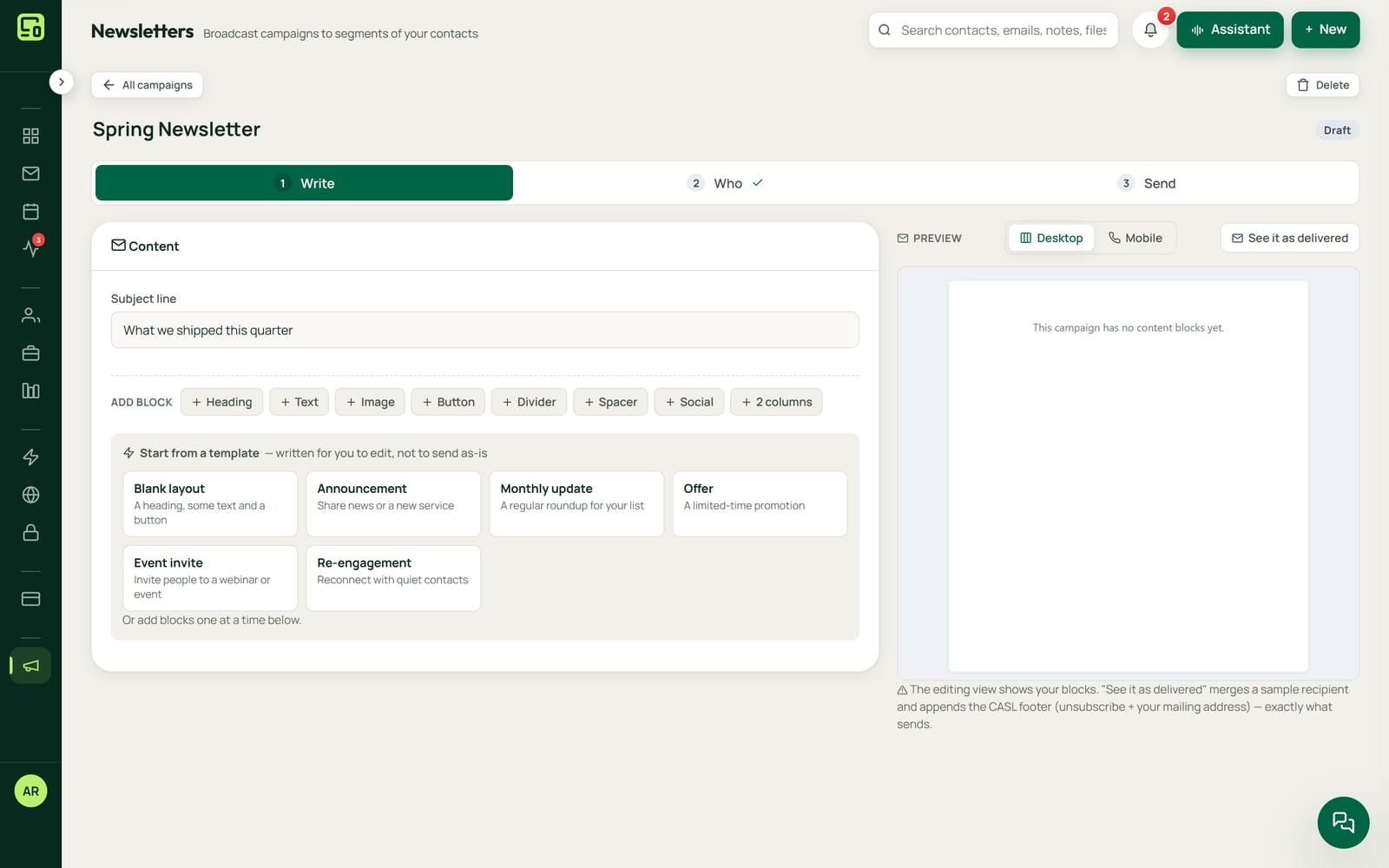
Drag and stack blocks into a newsletter, starting from your brand kit or one of five starter templates. The builder renders email that holds together in Outlook, and the preview is identical to what sends.
Choose who gets it
Build the audience from tags and saved views, with exclusions. The audience reads as a sentence, and every person left out is named with the reason, so nobody is dropped without you seeing why.
Check it, then send or schedule
A campaign takes three steps. NameCRM checks it before sending and previews the email as it will arrive, in your letter frame and signature. A scheduled campaign starts within about five minutes of its time.
The legal footer comes first
A campaign refuses to send without a mailing address and one-click unsubscribe in its footer. Consent under Canada's anti-spam law is checked as each email leaves, and the check fails closed.
Follow up on who did not open
Send again to the people who did not open, as a new campaign linked to the first. Pause and resume a send while it goes out in batches, and see opens and clicks as a share of the mail delivered.
Sequences and the bookings they bring
Drip sequences stop the moment someone really replies, treat an out-of-office reply as no reply and show why each one stopped. A booking made within 30 days of a campaign, with the same email address, is credited to that campaign.
An example
A furnace tune-up newsletter, from the first block to the bookings
Amrit runs a small heating and cooling company. In September she opens the newsletter builder, starts from one of the starter templates, swaps in her brand kit and stacks a photo, a short note about fall tune-ups and a button to her booking page.
For the audience she picks her furnace clients tag and excludes a saved view of clients already booked this month. The audience reads back as a sentence, and the people left out are named with the reason, including a client who unsubscribed in the spring.
Before it can go, the campaign's check flags that its footer has no mailing address, and it will not send without one. She adds the company address in Settings, previews the email as it will arrive in her own letter frame and signature, and schedules it for Tuesday at 7 am. It starts within about five minutes of that time.
The campaign goes out in batches, and its card shows opens and clicks as a share of the mail delivered. A week later she sends it again to the people who did not open, as a new campaign linked to the first.
Over the next month, clients book tune-ups on her booking page. Each booking made with the same email address within 30 days of the send is credited to the campaign, and its card counts them. She enrols new clients in a short welcome sequence, which stops the moment one of them writes back with a real question, and not when an out-of-office reply arrives.
The names in this example are made up.
Every feature
Everything newsletters and campaigns do today
Each card is one feature, in the words of NameCRM's own feature records. Live means it is in use in our own agency; NameCRM is not on sale yet.
Newsletters, campaigns and sequences
Broadcast campaigns
Campaigns take three steps, show the audience as a sentence, check seven things before sending and preview the email as it will arrive; a scheduled campaign starts within about five minutes of its time, in your letter frame and signature.
Segments with every exclusion named
Audiences are built from tags and saved views with exclusions, and every excluded person is named with the reason.
Resend to non-openers and analytics
Send again to the people who did not open, as a new campaign linked to the first, pause and resume a send while it goes out in batches, and see opens and clicks as a share of the mail delivered.
Sequences that stop on a real reply
Drip sequences stop the moment someone genuinely replies, recognise out-of-office replies as not a reply, and show the reason each one stopped.
Bookings credited to the campaign
When someone books on your booking page within 30 days of being sent a campaign, with the same email address, the booking is credited to that campaign, and its card counts those bookings.
Limits
What it does not do yet
Reminder rules for billing, follow-up and letters, by text and email, are built but not switched on yet.
NameCRM's email runs on Microsoft 365 only. Gmail is not supported yet, so newsletters need a Microsoft 365 account.
FAQs
Questions about newsletters and campaigns in NameCRM
How does NameCRM handle Canada's anti-spam law for newsletters?
Two safeguards are built into every send. A campaign refuses to go out without a mailing address and a one-click unsubscribe in its footer, and consent under Canada's anti-spam law is checked at the moment mail leaves, failing closed. Every person an audience leaves out is named with the reason.
How do I know whether a NameCRM campaign worked?
Each campaign shows opens and clicks as a share of the mail delivered, and you can send again to the people who did not open, as a new campaign linked to the first. When someone books on your booking page within 30 days of a campaign, using the same email address, the booking is credited to it.
What is the difference between a campaign and a sequence in NameCRM?
A campaign is one email to an audience you build, sent now or at a set time, in batches you can pause and resume. A drip sequence is a series of emails that stops the moment someone genuinely replies, treats an out-of-office reply as no reply, and shows the reason each one stopped.
What do newsletters and campaigns cost in NameCRM?
Newsletters and campaigns come with NameCRM, and NameCRM is not on sale yet. Request access and we will walk you through it on your own work. Pricing is set with you after that walkthrough, because every business is set up differently. To talk it through now, call 604-900-2060.
Can you build email campaigns like this into my own system?
Yes. Nametech Canada builds custom CRMs for other businesses, using the same work that made NameCRM, and a custom system can send to a list with the same footer and consent checks. Start with a free 30-minute assessment, and we will tell you what your lists and your sending would need.
Custom software
Want campaigns like this in your own system?
Any of these features can also be custom built into a new system for your business, by the team that made NameCRM. Start with a free 30-minute assessment.
Other parts of NameCRM
- Clients, pipeline and follow-up
- Lead capture and website assessments
- Email and AI drafting
- Texting and business phone
- Calendar, booking and meetings
- Quotes, letters and e-signature
- Invoices, payments and QuickBooks
- Client portal and files
- Reports and dashboard
- Mobile app and team chat
- Integrations
- AI receptionist
- Security