
NameCRM email: your Microsoft 365 inbox on every client's record, with AI drafts a person sends
NameCRM opens your Microsoft 365 mailbox inside the CRM and files every email onto the right client, even mail you send from Outlook. AI drafts replies in your voice from the client's history, and nothing an AI writes is sent until a person presses Send.
In this guide
In short
- What it is: a full mail client for your Microsoft 365 mailbox inside NameCRM, with folders, search, templates, send later and undo send, and every email filed onto the right client.
- Who it is for: service businesses on Microsoft 365 that answer clients by email all day and want every message on the client's record. Gmail is not supported yet.
- What the AI does: it drafts replies in your learned voice from the client's history, polishes and translates what you wrote, suggests subject lines and sums up long threads. A person always presses Send.
- Where the data is kept: client records and files are stored in Canada. The application's servers are in the United States, and its AI services run outside Canada too; our AI trust page names each one.
How it works
From your mailbox to a reply in your voice
Connect Microsoft 365 once
One organisation-wide connection brings your Microsoft 365 mailbox into NameCRM. Any business address on the account can send from it with its own signature, and a reply goes out from the address the client wrote to.
The inbox sorts itself
Each email is sorted into People, Automated or marketing slop by rules you teach in one tap, before any AI is used. A new lead starts in People, and the Unread and Needs reply filters show what is waiting.
Every email lands on the client
Mail you send from NameCRM or from Outlook directly, and every reply you receive, is filed onto the right client, so the client's page holds the whole conversation. Opening an email shows the whole thread above it.
Write with the client in view
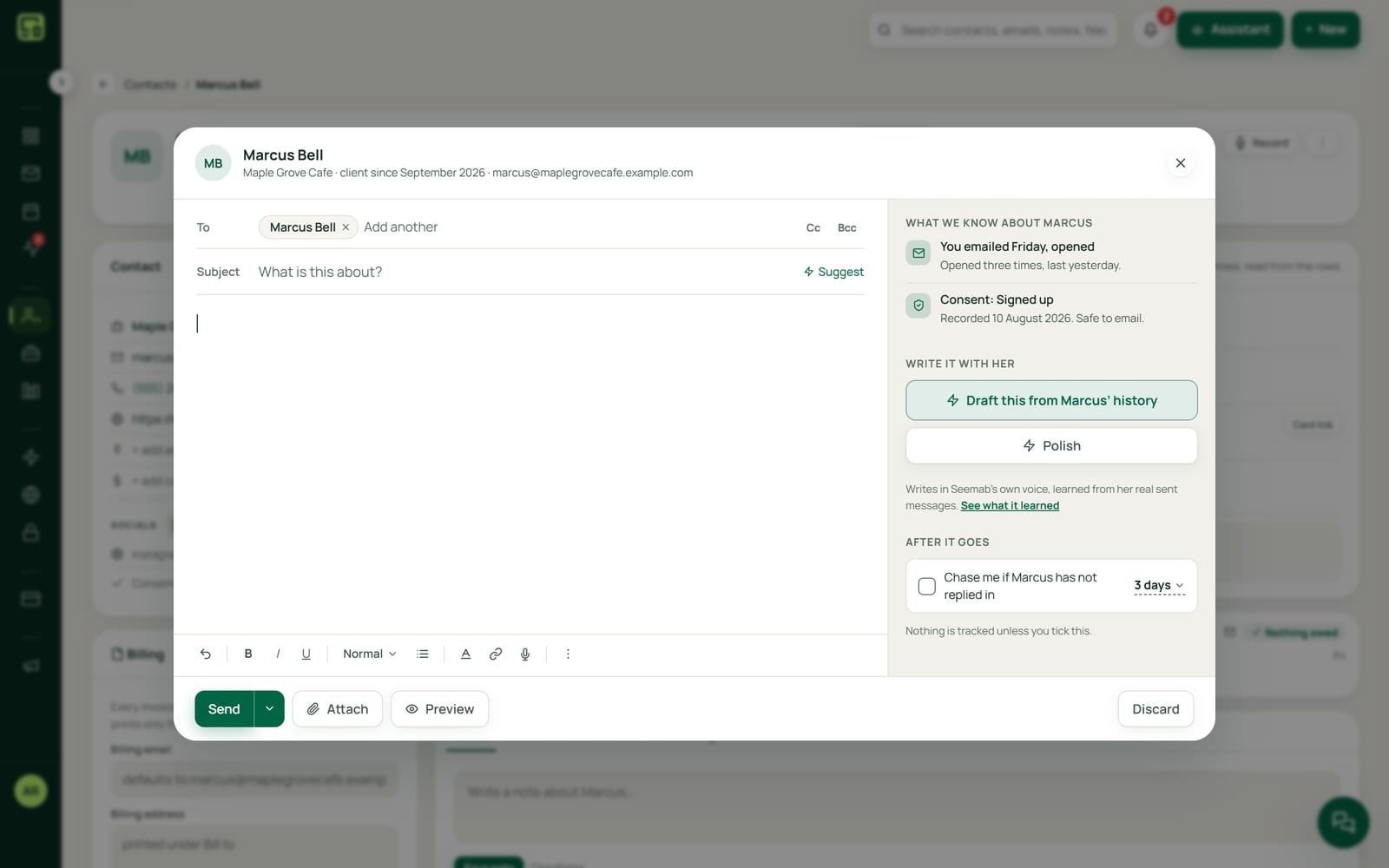
The composer shows what the AI knows about the person you are writing to and attaches the real quote, invoice or letter PDF, not a link. Templates with merge fields refuse to send while any blank is unfilled.
Let the AI write the first draft
Ask for a draft and it writes as you from the client's history, without inventing a meeting, price or date. Polish or translate it, take a suggested subject line, then send now or schedule it, with a short undo window after Send.
An example
A patio enquiry, answered from one inbox
Priya runs a small landscaping company and reads her business mail in NameCRM. At 7:30 she opens the inbox. Supplier notices sit under Automated, two newsletters sit under marketing slop, and a new email from a homeowner named Owen sits under People, where a new lead starts by default.
Owen wants a quote for a backyard patio and has attached a sketch of his yard as a PDF. The AI reads it and files a short private note on his record about what the sketch shows. His email is tagged needs info, because he has not said how big the patio should be.
Priya asks for a draft. It reads the whole thread, writes in her own voice and asks Owen for the size and the slope of the yard, without inventing a price or a date. She changes one line, picks one of the three subject lines offered and presses Send, with the short undo window there if she spots a typo.
That evening Owen opens her email, and the open shows on his timeline; her own reading never counts as his. He answers from his phone. Priya replies from Outlook on hers on the way home, and both emails are filed onto his page anyway.
By Friday the thread is long, so Priya reads its three bullet summary before she writes again. She starts the quote email from her template, which will not send while a blank is unfilled, attaches the quote PDF itself rather than a link, and schedules it for 8 am Saturday. Every email between them, the ones she wrote in Outlook included, sits on his page in order.
The names in this example are made up.
Every feature
Everything email and AI drafting do today
Each card is one feature, in the words of NameCRM's own feature records. Live means it runs every day in our own agency; NameCRM is not on sale yet.
Your Microsoft 365 inbox and the composer25 features
Microsoft 365 inbox inside the CRM
A full mail client runs your Microsoft 365 mailbox inside the CRM, with folders, conversations, flags, reply and forward, search across a whole folder, Unread and Needs reply filters, and delete only ever moves mail to Deleted Items.
What sets it apartA full mail client inside the CRM rather than a sidebar plug-in.
- The backfill was our own mailbox
Every email filed to the right client
Mail you send from Outlook directly, and every reply you receive, is filed onto the right client automatically, with history backfilled to January.
What sets it apartMail written outside the CRM still reaches the client page and the AI.
People, Automated and slop
Every inbox row is sorted into People, Automated or marketing slop by rules you teach in one tap, known contacts and Microsoft's own verdict, before any AI is spent.
What sets it apartA new lead defaults to People, so a real person is never foldered away.
One branded email shell
Every email the system sends, and every email you compose, goes out on one branded layout, and a build gate refuses any code that tries to send a second look.
What sets it apartBrand consistency is enforced by an automated gate, not a style guide.
Canadian anti-spam consent at send time
Consent under Canada's anti-spam law is checked at the moment mail leaves, failing closed, and every commercial email carries a one-click unsubscribe with undo.
What sets it apartCASL compliance is built into the send path, not left to the user.
Emergency mail rail
If your mail provider blocks outbound sending, NameCRM switches to a second delivery rail and files a copy in Sent Items, with a banner saying which rail is active.
What sets it apartAutomatic failover to a second mail provider is rare in small-business CRMs.
Every business address, no per-mailbox setup
Any address on your Microsoft 365 business account can send from the CRM through one organisation-wide connection, with its own signature, and replies go out from the address the client wrote to.
Queue for review
A message can be queued for review instead of sent, and the Outbox shows every scheduled and review item as a chat, grouped by person.
A composer that knows the client
The composer rail follows whoever you are writing to, shows what the AI knows about them, and attaches the actual invoice, quote or letter PDF rather than a link.
Undo send
Every email has a short undo window after you press Send.
Send later that keeps its promise
Emails and texts can be scheduled for the exact time you pick, moved from the Outbox, and can never send twice or after you cancel.
One switchboard for automatic messages
Settings lists every message clients receive on their own, each with its own on and off switch, and nothing an AI writes is ever among them.
Templates with a blank guard
A template library with folders and merge fields refuses to send while any blank is unfilled, so no client ever receives a raw placeholder.
Drafts that follow you
A saved draft lands in your real mailbox Drafts folder on every device and keeps its attachments and Bcc when you pick it up again.
Signature designer
A signature designer builds a branded signature card with logo and live preview for each sending identity.
- A check our own team runs
Every email fits a phone
An automated check renders all 37 system emails at phone width and refuses any that overflow or wrap a button.
Mail that survives dark mode
Outgoing mail is wrapped so a recipient's dark mode does not paint black text on black, pasted text is cleaned of colours that would break it, and mail you receive is recoloured for dark theme with pictures untouched.
Unsubscribe from incoming newsletters
Newsletters you receive can be unsubscribed from in one click inside the inbox.
Honest bounce health
An address is only marked bad on a real permanent failure, so a spam filter on the other side never gets a good client blacklisted.
Open tracking
Email opens are tracked and shown on the client's timeline, and your own reading is never counted as the client's open.
SPF, DKIM and DMARC check
A built-in check reads the SPF, DKIM and DMARC records on your sending domains so mail lands in the inbox.
Internal notices kept internal
Notices meant for you come from NameCRM to your own inbox and stay off the client's record, while letters to clients come from you by name.
Recipient autocomplete
To, Cc, Bcc and the text field autocomplete from your contacts, with visible wells so you always see who a message will reach.
Clear the unread pile safely
On Unread, Clear marks old and promotional email read in one press after showing how many and who from, never mail from a contact or one still owed a reply, and everything has an Undo.
Reply-ready threads
Opening an email shows the whole conversation above it, the AI reply reads the full thread so it never repeats or contradicts you, and one tap records a thread as handled elsewhere.
AI drafts in your own voice9 features
- Measured on our own sent mail
AI that learns how you write
NameCRM measured its owner's writing across 1,047 of her real sent messages, pairing her replies with the messages they answered, and a new voice profile only goes live when a person approves it.
What sets it apartThe voice comes from your real sent mail with quoted history stripped out, not from a tone slider.
Drafts in your voice from the whole record
AI drafts an email or text as you, grounded in the client's emails, texts, notes, meetings and projects, never their payments or invoices, and is forbidden to invent a meeting, price or date.
What sets it apartDrafts wear your learned voice plus real past exchanges with that same person.
No AI tells
Every piece of AI-written text passes a deterministic cleanup that strips the dashes and stock phrases that make writing read as machine made, and a gate stops any that slip through.
What sets it apartA code-level scrub on every model output, enforced by a build gate.
Polish and translate
AI polishes what you already wrote for clarity without changing a fact, name, number or promise, can translate it, and undoes in one tap.
Subject line suggestions
Three specific subject lines, drawn only from the body you wrote, appear as click-to-apply chips.
Thread summary
A long email thread collapses to exactly three bullets written only from the thread's own text.
Reply intent tags
Incoming emails and texts are tagged interested, needs info, objection, not now, positive or upset, and an honest unclassified is allowed rather than a guess.
Attachment reading
AI reads a PDF, image or text file a client sends, up to 12 MB, and files a short private note of what it says on their record.
- Our own rule, enforced in code
One name a client meets
Assistant prompts, builder prompts and AI draft examples only ever name the business's public face, and a gate refuses code that adds another name.
Limits
What it does not do yet
NameCRM works with Microsoft 365 mailboxes only. Gmail is not supported yet.
There is no add-in that puts NameCRM inside the Outlook app. Your mailbox opens inside NameCRM instead, and mail you send from Outlook directly is still filed onto the right client.
FAQs
Questions about NameCRM email
Does NameCRM work with Outlook and Gmail?
It works with Microsoft 365. Your mailbox opens inside NameCRM, and mail you send from Outlook directly is still filed onto the right client, along with every reply you receive. Any address on your Microsoft 365 business account can send from NameCRM, each with its own signature. Gmail is not supported yet.
Does the AI send emails to my clients on its own?
No. The AI drafts, polishes and suggests, and a person presses Send. The messages that go out on their own are fixed, factual notices, such as booking confirmations and payment receipts. Settings lists every one with its own on and off switch, and nothing an AI writes is ever among them.
How does the AI learn to write like me?
It reads your real sent mail with quoted history stripped out, pairing your replies with the messages they answered, rather than offering a tone slider. A new voice profile goes live only when a person approves it, and every draft passes a cleanup that strips the stock phrases that make writing read as machine made.
Is my email used to train the AI?
No. We have set each AI provider NameCRM uses so that the content we send them is not used to train their models. Client records and files are stored in Canada, in Montreal. The servers that run the application are in the United States, and the AI services run outside Canada too; our AI trust page names each one.
How does NameCRM handle Canada's anti-spam law?
Consent under Canada's anti-spam law is checked at the moment mail leaves, so a person who unsubscribed is left off commercial mail even when it was scheduled earlier. Every commercial email carries a one-click unsubscribe with undo, and an address is marked bad only on a real permanent failure, never because of a spam filter.
What does email in NameCRM cost?
Email and AI drafting come with NameCRM, and NameCRM is not on sale yet. Request access and we will walk you through it on your own work. Pricing is set with you after that walkthrough, because every business is set up differently. To talk it through now, call 604-900-2060.
Can you build an inbox like this into my own business system?
Yes. Nametech Canada builds custom CRM systems for other businesses, using the same work that made NameCRM's inbox and AI drafting. Start with a free 30-minute assessment, and we will tell you what your system would need and how it should connect to the mail you already use, such as Microsoft 365.
Custom software
Want an inbox like this in your own system?
Any of these features can also be custom built into a new system for your business, by the team that made NameCRM. Start with a free 30-minute assessment.
Other parts of NameCRM
- Clients, pipeline and follow-up
- Lead capture and website assessments
- Texting and business phone
- Calendar, booking and meetings
- Quotes, letters and e-signature
- Invoices, payments and QuickBooks
- Client portal and files
- Newsletters and campaigns
- Reports and dashboard
- Mobile app and team chat
- Integrations
- AI receptionist
- Security