
NameCRM invoices, payments and QuickBooks Online: bill once, get paid, and the books already agree
NameCRM writes the invoice, takes the card payment through Stripe and keeps QuickBooks Online in step. Monthly plans bill themselves, overdue invoices line up for follow-up, and every payment, refund and fee reaches the books with the same numbers.
In this guide
In short
- What it is: invoices, payments, recurring plans and a card wallet inside NameCRM, run through Stripe and mirrored to QuickBooks Online, with totals checked across all three.
- Who it is for: service businesses that bill deposits, installments or monthly fees and want their accountant working in QuickBooks Online with no double entry.
- How clients pay: by card from the Pay button in the invoice email or their portal, or by e-Transfer, cash or cheque, which you record against the invoice.
- Card numbers: Stripe holds every one. NameCRM never touches a card number, even when a client keeps several cards on file.
- Where the data is kept: client records and files are stored in Canada, in Montreal, and the servers that run the application are in the United States. What goes to Stripe and QuickBooks Online is held by those services too.
How it works
From an invoice to the books
Build the invoice
The full-page builder saves as you type, with tax per line, No GST lines, a discount line, due terms, a memo, a PO reference and CAD or USD. Line items autocomplete from your services, QuickBooks items and Stripe products at once.
Finalize it through Stripe
The invoice is finalized through Stripe and verified to the cent. If the totals disagree, the Stripe copy is voided and your draft stays untouched. The email carries a Pay button and the PDF, which prints your GST number.
Get paid, and hear about it
When a client pays online, the bell and your phone say who paid and how much. An e-Transfer, cash or cheque is recorded against the invoice, part payments included, and one factual receipt goes out once the money settles.
Plans bill themselves
When a client signs, each monthly service in the agreement becomes a plan waiting to start. Payments the agreement sets are invoiced by email and text on their due day, or charged to the saved card on the day it sets.
Chase what is late
Overdue invoices line up oldest first with reminder drafts that escalate from gentle to firm to final, and a promised date shows when a promise is missed. A statement of account shows every invoice and payment, and how many days each open invoice is past due.
The books keep up
Customers, estimates, invoices, payments, refunds, fees and payouts are mirrored to QuickBooks Online, with card money run through a clearing account. Totals are checked across Stripe, NameCRM and QuickBooks, and the Books tab reads QuickBooks' own reports.
An example
An office cleaning contract, from the first month to the books
Lena runs a small office cleaning company in Burnaby. Owen, who manages a dental office, signs her agreement for a monthly cleaning plan. The moment he signs, the monthly service becomes a plan waiting to start, and he pays the first month by card in one step. His card is saved for the months that follow.
Lena's phone tells her that Owen paid and how much. On the first day of cleaning she sets one start date on the plan, and from then on the Plans board shows it beside her other plans, with monthly and yearly totals in Canadian dollars.
In the spring Owen asks for a carpet clean. Lena opens the invoice builder, starts typing and picks the service from her own list, then adds the PO number his office gave her. She finalizes it, the totals are checked against Stripe to the cent, and Owen gets an email with a Pay button and the PDF.
His office pays half by e-Transfer. Lena records it against the invoice, and the Pay button now asks only for what is left. When the rest is paid by card, one receipt goes out, and it never says a card paid for the e-Transfer.
One month his saved card is declined. The bell tells Lena why, and she sends Owen a secure link to add a new card, with his consent recorded. Her bookkeeper retypes none of it: the customer, the invoices, the payments and the Stripe fees are already in QuickBooks Online with the same numbers.
The names in this example are made up.
Every feature
Everything invoices, payments and plans do today
Each card is one feature, in the words of NameCRM's own feature records. Live means it runs every day in our own agency; NameCRM is not on sale yet.
Invoices, payments and the books24 features
QuickBooks Online mirror
Customers, estimates, invoices, payments, refunds, fees and payouts are mirrored to QuickBooks Online with the same numbers, and card money runs through a clearing account so nothing double counts.
What sets it apartThe accountant works in QuickBooks with no double entry.
Every bill ahead, on its day
Billing's Upcoming page shows every bill your agreements and plans will send in the next 12 months, each on its own day, by month, by agreement or on a calendar, and lists apart those still waiting for a day.
What sets it apartIt reads the same schedule the morning invoice run uses, so what it shows is what will go out.
Full-page invoice builder
A full-page invoice builder saves as you type, with tax per line, No GST lines, a discount line, due terms, memo, PO reference and CAD or USD.
One catalogue across three systems
Line items autocomplete from your services, QuickBooks items and Stripe products at once.
Numbered only when Stripe agrees
An invoice is finalized through Stripe and verified to the cent, and if the totals disagree the Stripe copy is voided and your draft stays untouched.
Invoice page with a timeline
Each invoice page shows one card for its state and a timeline from drafted to finalized, sent, paid and refunded.
Invoices that deliver themselves
Payments set in a signed agreement are invoiced by email and text on their due day, the first one when the client signs, plan renewals too, and a fully paid invoice sends exactly one receipt.
e-Transfer, cash and cheque
Record an e-Transfer, cash or cheque against an invoice, with part payments that never make Stripe ask for too much.
Refunds, credits and write-offs
Refund part or all of a payment, credit an open invoice without moving money, or write it off, and each reaches the books correctly.
Collections queue
Overdue invoices line up oldest first with reminder drafts that escalate from gentle to firm to final, plus a promised-date field that shows when a promise is missed.
Receipts that send themselves once
A factual receipt goes to the client automatically once money settles, exactly once, and never claims a card was charged for an e-Transfer.
Payments counted once
Stripe events are verified and stored before they are applied, so a payment is counted exactly once and paid never flips back.
Survives Stripe API changes
One compatibility reader understands every shape of Stripe's data, so a Stripe API change cannot quietly break payments, receipts or plans.
Payments and declines reach you
When a client pays an invoice online, the bell and your phone say who paid and how much, and when a plan renewal or a scheduled card charge is declined, the bell says why.
Revenue in one currency
US dollar payments are stored with the Canadian amount Stripe actually settled, so every revenue total adds in one currency.
Three-way reconciliation
Totals are checked across Stripe, NameCRM and QuickBooks, a sale is linked once so it never becomes a second invoice, and nothing merges silently.
Books tab
Revenue, expenses and profit by month are read live from QuickBooks' own reports, so the CRM never shows a second answer.
Bookkeeping rule book and review queue
A rule book files recurring transactions and a review queue catches the rest, so books are kept weekly instead of at tax time.
No phantom invoices
The zero-dollar trial invoices Stripe opens for future-dated plans are never turned into real invoices or sent to the books.
Billing in nine pages
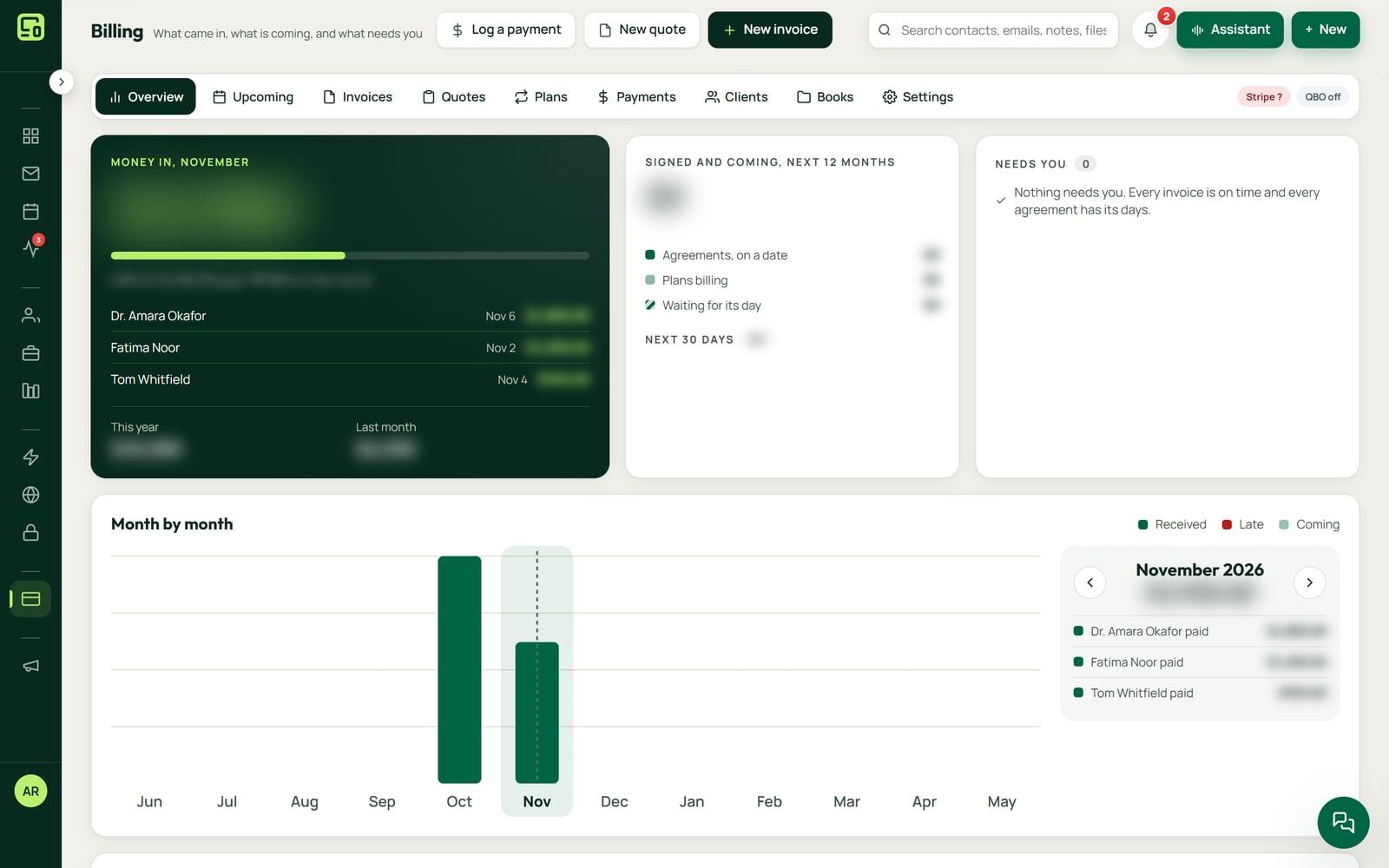
Billing has nine pages, from an Overview of your books and recurring revenue to Upcoming, Invoices, Plans, Payments and Clients, and every row opens its full record with a menu of what you can do.
Statements of account
Any client's statement shows every invoice and payment, how many days each open invoice is past due, and a Pay by card button on each one that takes cards, ready to print or send as a draft with the PDF.
One press moves money once
Recording a payment, a credit or a refund is saved in one step, so a double press, a retry or two open tabs never records it twice or sends money out twice.
Who pays slowest
Billing's Payments page shows how fast clients pay and who pays slowest, and its Clients page shows what each client owes and has paid this year.
Monthly plans and cards on file9 features
Card wallet
A client can keep several cards on file, Stripe holds every card number, and the default only changes for a good reason such as expiry or two failures.
What sets it apartCard-on-file billing without the CRM ever touching a card number.
Sign, then pay the first month
After signing a monthly agreement, the client pays the first month by card in one step, the card is saved for future months, and a decline gets one polite try-another-card email.
What sets it apartSigning, first payment and the recurring plan happen in one flow.
Plans that bill themselves
Recurring plans collect by emailed invoice or by charging the card on file, and the Plans board shows every running plan with monthly and yearly totals in Canadian dollars.
Care plans from acceptance
A care plan is scheduled when a quote is accepted and started on delivery, with pause, resume and cancel at period end, and failed renewals drafted for follow-up.
Ask any contact for a card
Send any contact a secure link to add a card, valid for 60 days, with their consent recorded.
Monthly charge from the plan
A client's monthly charge is always read from their live plan, so the number on their record cannot drift from what is actually billed.
Knows how each client pays
The invoice and plan builders know whether a client pays by card or invoice and default to the card on file.
Card installments on the agreed day
A payment the signed agreement charges to a saved card is charged on the day it sets, or invoiced by email and text when no card is saved, and wording it cannot read for sure waits for a person.
Signing sets up the monthly plans
When a client signs, each monthly service in the agreement becomes a plan waiting to start, so launch day is setting one date instead of building plans by hand.
Limits
What it does not do yet
The books connection is QuickBooks Online. NameCRM does not connect to QuickBooks Desktop or Xero today.
Card payments run through Stripe only. NameCRM does not connect to another card processor today.
Invoices are written in Canadian or US dollars, not in other currencies.
NameCRM is built for British Columbia today, with GST handled on top and Pacific time. Other regions come later.
FAQs
Questions about invoices, payments and QuickBooks in NameCRM
Does NameCRM work with QuickBooks Online or QuickBooks Desktop?
QuickBooks Online. Customers, estimates, invoices, payments, refunds, fees and payouts are mirrored to it with the same numbers, card money runs through a clearing account so nothing double counts, and the Books tab reads QuickBooks' own reports. NameCRM does not connect to QuickBooks Desktop today.
Does NameCRM keep my clients' card numbers?
No. Stripe holds every card number, and NameCRM never touches one. A client can keep several cards on file, and the default card changes only for a good reason, such as expiry or two failures. You can send any contact a secure link to add a card, valid for 60 days, with their consent recorded.
Can clients pay by e-Transfer, cash or cheque?
Yes. You record an e-Transfer, cash or cheque against the invoice, part payments included, and the Pay button then never asks for more than is left. One factual receipt goes to the client once the money settles, and it never claims a card was charged for an e-Transfer. The payment is mirrored to QuickBooks Online too.
What happens when a client's card is declined?
When a plan renewal or a scheduled card charge is declined, the bell tells you why. If the first month's card payment after a client signs a monthly agreement is declined, the client gets one polite email asking them to try another card. You can also send them a secure link to add a new card.
What do invoicing and payments in NameCRM cost?
Invoices, payments and the QuickBooks connection come with NameCRM, and NameCRM is not on sale yet. Request access and we will walk you through it on your own work. Pricing is set with you after that walkthrough, because every business is set up differently. To talk it through now, call 604-900-2060.
Can you connect Stripe and QuickBooks Online for my own business?
Yes. Nametech Canada connects Stripe and QuickBooks Online for other businesses, using the same work that keeps NameCRM's books in step. Start with a free 30-minute assessment, and we will tell you what your invoices, payments and books would need and how they should connect.
Custom software
Want invoicing and QuickBooks in your own system?
Any of these features can also be custom built into a new system for your business, by the team that made NameCRM. Start with a free 30-minute assessment.
Other parts of NameCRM
- Clients, pipeline and follow-up
- Lead capture and website assessments
- Email and AI drafting
- Texting and business phone
- Calendar, booking and meetings
- Quotes, letters and e-signature
- Client portal and files
- Newsletters and campaigns
- Reports and dashboard
- Mobile app and team chat
- Integrations
- AI receptionist
- Security